Loading
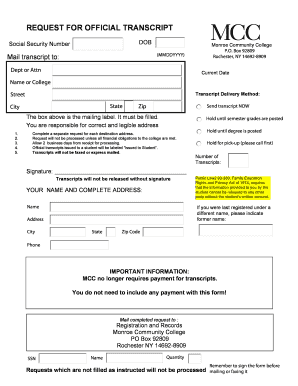
Get Transcript Request Form - Monroe Community College - Monroecc
How it works
-

Open form follow the instructions
-

Easily sign the form with your finger
-

Send filled & signed form or save
How to fill out the Transcript Request Form - Monroe Community College - Monroecc online
Filling out the Transcript Request Form accurately is essential for obtaining your official transcripts from Monroe Community College. This guide will walk you through each section of the form, ensuring that you provide all necessary information correctly.
Follow the steps to complete the Transcript Request Form effectively.
- Click ‘Get Form’ button to acquire the form and open it in your preferred editing tool.
- Begin by entering your date of birth in the specified format (MMDDYYYY). This is important for identifying your records.
- Input your Social Security Number, which is needed for verification purposes. Ensure accuracy in this field.
- Fill out the mailing address section accurately by providing the appropriate department or attention line, followed by the main address for Monroe Community College.
- Indicate your current date on the form, as it helps in processing your request.
- Provide your full name and, if applicable, any former name under which you were last registered at the college.
- Choose your preferred transcript delivery method and fill in the complete mailing address, including street, city, state, and zip code.
- Select your request preferences for the transcripts, such as sending them immediately, holding until semester grades are posted, or holding for pick-up.
- Indicate the number of transcripts requested in the designated space.
- Ensure that you sign the form, as transcripts cannot be released without your signature.
- Once you have completed all fields, review your form for accuracy and clarity.
- Use the PRINT button at the bottom of the form to print a copy of your completed request. Do not use the print buttons above.
- Mail the completed request to the Registration and Records department of Monroe Community College.
Complete your transcript request form online to ensure a smooth and efficient process.
Log in to the MyHCC portal using your full hawkmail email address and password. Select 'Sign in to WebAdvisor' and then 'Log In' Select the 'Students' menu and under 'Academic Profile' select 'Transcript.