Loading
Get Apply For Loan Increase Monroe Community College Form
How it works
-

Open form follow the instructions
-

Easily sign the form with your finger
-

Send filled & signed form or save
How to fill out the Apply For Loan Increase Monroe Community College Form online
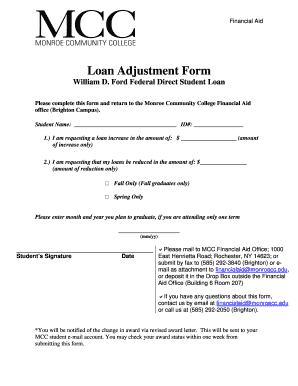
Navigating the loan increase application process at Monroe Community College is made easier with this guide. This user-friendly overview provides step-by-step instructions to assist you in completing the Apply For Loan Increase form online.
Follow the steps to successfully complete your loan increase application.
- Click ‘Get Form’ button to obtain the form and open it in the editor.
- Enter your full student name in the designated field. This ensures that your application is correctly associated with your student records.
- Indicate the amount of loan increase you are requesting in the section labeled 'I am requesting a loan increase in the amount of: $'. Ensure you only include the amount you wish to increase.
- If you are attending for only one term, enter your expected graduation month and year in the section provided. Ensure you format it as mm/yy.
- Submit the completed form by either mailing it to the MCC Financial Aid Office, faxing it to the designated number, emailing it as an attachment, or placing it in the Drop Box outside the Financial Aid Office. Ensure you choose one method for submission.
- Finally, remember that you will receive a notification regarding your loan increase via a revised award letter sent to your MCC student email account. Check your award status within one week of submission to stay updated.
Take the next step in your financial aid journey by completing your application online today.
Grant Eligibility If you are interested in our grants, or in any federal student aid, start by submitting a Free Application for Federal Student Aid (FAFSA®) form. To continue receiving federal student aid, fill out the FAFSA form every year you're in school.