Loading
Form preview
  • US Legal Forms
  • Form Library
  • More Forms
  • More Uncategorized Forms
  • Employee Coaching Form

Get Employee Coaching Form

Provide your student employees the orientation, training, and mentoring theyneed to succeed. Motivate your student employees through goalsetting,individualized rewards, and recognition and advancement.

How it works

  1. Open form

    Open form follow the instructions

  2. Easily sign form

    Easily sign the form with your finger

  3. Share form

    Send filled & signed form or save

How to fill out the Employee Coaching Form online

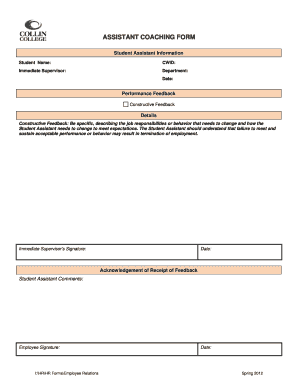
The Employee Coaching Form is an essential tool for providing constructive feedback to student assistants regarding their performance. This guide will walk you through each section of the form, ensuring you understand how to complete it accurately and effectively.

Follow the steps to fill out the Employee Coaching Form with ease.

  1. Click ‘Get Form’ button to obtain the form and open it in the editor.
  2. Begin by filling in the 'Student Assistant Information' section, including the student's name, CWID (Campus Wide Identification Number), their immediate supervisor's name, the department, and the date.
  3. In the 'Performance Feedback' section, provide specific and constructive feedback. Detail the job responsibilities or behaviors that need improvement, and clearly describe how the student assistant needs to adjust their performance to meet expectations.
  4. Ensure that the feedback provided is clear and actionable, emphasizing that failure to meet the outlined expectations may have consequences regarding their employment status.
  5. Have the immediate supervisor sign the form, followed by the date to confirm the completion of this feedback process.
  6. In the 'Acknowledgement of Receipt of Feedback' section, encourage the student assistant to provide their comments regarding the feedback received.
  7. The student assistant must sign the form to acknowledge receipt of the feedback, along with the date of signing.
  8. Finally, save your changes, download a copy for your records, print the form if necessary, or share it with relevant parties as needed.

Complete the Employee Coaching Form online today to enhance performance and support development.

Get form

Experience a faster way to fill out and sign forms on the web. Access the most extensive library of templates available.
Get form

Related content

Coaching Session Handouts
exciting aspect of FEP Refocus is the training opportunities that will be available to all...
Learn more
employee coaching form - Kansas State University
NOTE: Employee's signature indicates that this information has been discussed with the...
Learn more
Workforce 2020 white paper - Cisco
Almost all the respondents say that working with strong coaches and mentors is ... As an...
Learn more

Related links form

Power Of Attorney - TN.gov - Tn Tennessee Bus 424 Tci Waiver Form Tn Certified Peer Recovery Specialist Training Application-MH ... - TN.gov - Tn

Questions & Answers

Get answers to your most pressing questions about US Legal Forms API.

Contact support

The essential components to include in your coaching plan A dedicated mentor or coach. ... Individual development plans. ... Session agenda to guide conversations. ... Meaningful accountability. ... Peer support. ... Diagnose where employee skills are today and where they'll need to be in the future.

How to create a coaching plan Establish the employees' strengths. ... Locate any areas of improvement. ... Ask the employee to evaluate their performance. ... Determine any obstacles in the way of the employee's success. ... Provide potential solutions to help the employee overcome the obstacle. ... Develop short-term and long-term goals.

5 Steps in Creating a Coaching Form Identify the type of concern or issue to discuss. ... Describe the specific issue or concern in detail. ... Formulate action items to address the problem. ... Set a follow-up session. ... Complete the form with signatures.

A coach might work with the employee to discover their anxieties and devise strategies for dealing with them. For example, a coach may help an employee who is worried about working with a new group learn effective communication, proper introduction, and collaboration with new team members.

It serves as a reinforcement of what you discussed. Documentation for HR purposes – If you need to justify a promotion or placing a direct report on a performance improvement plan, your coaching documentation provides a record of the actions you have taken to date.

What is a Coaching Form? A coaching form is an essential tool that can help guide supervisors and managers conduct effective employee coaching sessions.

Coaching documentation is an essential aspect of the coaching process. It involves the creation and maintenance of records, forms, and notes that help track the progress of the coaching relationship and support the coach in delivering effective and efficient coaching services to their clients.

The form should be filled out during or before the first session with the client. It should include questions about their goals and desires, any previous experience they might have had, and their reasons for coming to coaching.

Get This Form Now!

Use professional pre-built templates to fill in and sign documents online faster. Get access to thousands of forms.
Get form
If you believe that this page should be taken down, please follow our DMCA take down processhere.

Industry-leading security and compliance

US Legal Forms protects your data by complying with industry-specific security standards.
  • In businnes since 1997
    25+ years providing professional legal documents.
  • Accredited business
    Guarantees that a business meets BBB accreditation standards in the US and Canada.
  • Secured by Braintree
    Validated Level 1 PCI DSS compliant payment gateway that accepts most major credit and debit card brands from across the globe.
Get Employee Coaching Form
Get form
  • Adoption
  • Bankruptcy
  • Contractors
  • Divorce
  • Home Sales
  • Employment
  • Identity Theft
  • Incorporation
  • Landlord Tenant
  • Living Trust
  • Name Change
  • Personal Planning
  • Small Business
  • Wills & Estates
  • Packages A-Z
  • Affidavits
  • Bankruptcy
  • Bill of Sale
  • Corporate - LLC
  • Divorce
  • Employment
  • Identity Theft
  • Internet Technology
  • Landlord Tenant
  • Living Wills
  • Name Change
  • Power of Attorney
  • Real Estate
  • Small Estates
  • Wills
  • All Forms
  • Forms A-Z
  • Form Library
  • Legal Hub
  • About Us
  • Help Portal
  • Legal Resources
  • Blog
  • Affiliates
  • Contact Us
  • Delete My Account
  • Site Map
  • Industries
  • Forms in Spanish
  • Localized Forms
  • State-specific Forms
  • Forms Kit
  • Real Estate Handbook
  • All Guides
  • Notarize
  • Incorporation services
  • For Consumers
  • For Small Business
  • For Attorneys
  • USLegal
  • FormsPass
  • pdfFiller
  • signNow
  • altaFlow
  • DocHub
  • Instapage
Form Packages
  • Adoption
  • Bankruptcy
  • Contractors
  • Divorce
  • Home Sales
  • Employment
  • Identity Theft
  • Incorporation
  • Landlord Tenant
  • Living Trust
  • Name Change
  • Personal Planning
  • Small Business
  • Wills & Estates
  • Packages A-Z
Form Categories
  • Affidavits
  • Bankruptcy
  • Bill of Sale
  • Corporate - LLC
  • Divorce
  • Employment
  • Identity Theft
  • Internet Technology
  • Landlord Tenant
  • Living Wills
  • Name Change
  • Power of Attorney
  • Real Estate
  • Small Estates
  • Wills
  • All Forms
  • Forms A-Z
  • Form Library
Customer Service
  • Legal Hub
  • About Us
  • Help Portal
  • Legal Resources
  • Blog
  • Affiliates
  • Contact Us
  • Delete My Account
  • Site Map
  • Industries
  • Forms in Spanish
  • Localized Forms
  • State-specific Forms
  • Forms Kit
Legal Guides
  • Real Estate Handbook
  • All Guides
Prepared for you
  • Notarize
  • Incorporation services
Our Customers
  • For Consumers
  • For Small Business
  • For Attorneys
Our Sites
  • USLegal
  • FormsPass
  • pdfFiller
  • signNow
  • altaFlow
  • DocHub
  • Instapage
Social Media
Call us now toll free:
+1 833 426 79 33
As seen in:
© Copyright 1999-2026 airSlate Legal Forms, Inc. 3720 Flowood Dr, Flowood, Mississippi 39232
  • Your Privacy Choices
  • Terms of Service
  • Privacy Notice
  • Content Takedown Policy
  • Bug Bounty Program