Loading
Get Banner Life Insurance Forms
How it works
-

Open form follow the instructions
-

Easily sign the form with your finger
-

Send filled & signed form or save
How to fill out the Banner Life Insurance Forms online
Filling out the Banner Life Insurance Forms online is a straightforward process that allows you to make necessary changes efficiently. This guide will walk you through each step to ensure that you complete the form accurately and effectively.
Follow the steps to successfully complete the Banner Life Insurance Forms online:
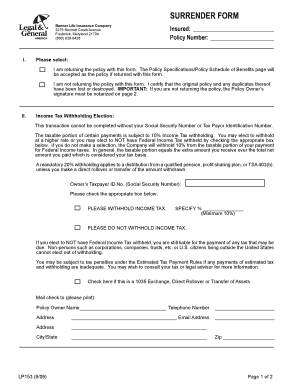
- Press the ‘Get Form’ button to access the form and display it in your preferred editor.
- In Section I, select whether you are returning the policy with the form or not. If you are not returning the policy, remember that the signature of the policy owner must be notarized.
- In Section II, provide your Social Security Number or Taxpayer Identification Number, as this is required for processing. Choose whether to withhold income tax by checking the appropriate box and specifying the percentage if applicable.
- Indicate if this transaction involves a 1035 Exchange, direct rollover, or transfer of assets, by checking the designated box.
- Fill in the mailing information, including the policy owner’s name, telephone number, addresses, and email address.
- In Section III, confirm the policy number and read through the required certifications. The policy owner and any additional required signatures must sign and date this section.
- If applicable, have the irrefutable beneficiary sign and date the form as well.
- Ensure that the form is notarized if you are not returning the policy with the form.
- Complete the checklist in Section IV to verify that all necessary information and signatures are included before submission.
Complete your Banner Life Insurance Forms online to ensure your transactions are processed smoothly and efficiently.
Look through financial records. Life insurance companies issue a lot of paperwork. ... Ask your family members. ... Call the State Commissioner's Office for your State. ... Ask a Family Member's Financial Advisor. ... Use Policy Inspector.