Loading
Get Vtr 265 Fm
How it works
-

Open form follow the instructions
-

Easily sign the form with your finger
-

Send filled & signed form or save
How to fill out the VTR 265 Fm online
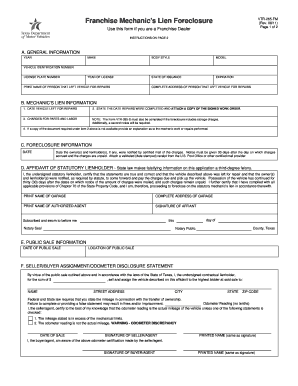
Filling out the VTR 265 Fm is a crucial step for Franchise Dealers seeking to initiate a mechanic's lien foreclosure. This guide provides a systematic approach to completing the form online, ensuring that all necessary information is accurately submitted.
Follow the steps to properly complete the VTR 265 Fm online.
- Click the 'Get Form' button to access the VTR 265 Fm and open it in the editor of your choice.
- Begin with Section A: General Information. Enter the vehicle's year, make, body style, model, the year of license, state of issuance, expiration date, vehicle identification number, and license plate number.
- In the same section, print the name and complete address of the person who left the vehicle for repairs.
- Proceed to Section B: Mechanic’s Lien Information. Enter the date the vehicle was left for repairs, and state the date repairs were completed. Make sure to attach a copy of the signed work order.
- List the charges for parts and labor in the designated field. Remember, if storage charges are included, you must also complete Form VTR-265-S.
- If you do not have a copy of the work order, provide a detailed explanation of the repairs performed.
- Move to Section C: Foreclosure Information. Enter the date when the owner(s) and lienholder(s) were notified by certified mail about the unpaid charges. Attach validated receipts from the certified mail provider.
- In Section D: Affidavit of Statutory Lienholder, print the name and complete address of the garage, along with the name of the authorized agent. The authorized agent should sign the affidavit, confirming the statements are true.
- For Section E: Public Sale Information, fill in the date and location of the public sale.
- Complete Section F: Seller/Buyer Assignment/Odometer Disclosure Statement. Include the sale price, buyer's name, address, and odometer reading. Both the seller and buyer must sign and print their names.
- Follow instructions in Section G regarding the foreclosure procedures to ensure compliance with state laws.
- Finally, review all sections for accuracy. Save your changes, and download or print the completed VTR 265 Fm for your records.
Complete your VTR 265 Fm online today to efficiently manage your mechanic's lien foreclosure.
Title applications are submitted and processed through the local county tax office. Under ELT, when a lien has been satisfied, the lender must submit an electronic release of lien. The lienholder is then removed from the record, receives an electronic notification and a paper title is sent to the owner.
Industry-leading security and compliance
US Legal Forms protects your data by complying with industry-specific security standards.
-
In businnes since 199725+ years providing professional legal documents.
-
Accredited businessGuarantees that a business meets BBB accreditation standards in the US and Canada.
-
Secured by BraintreeValidated Level 1 PCI DSS compliant payment gateway that accepts most major credit and debit card brands from across the globe.