Loading
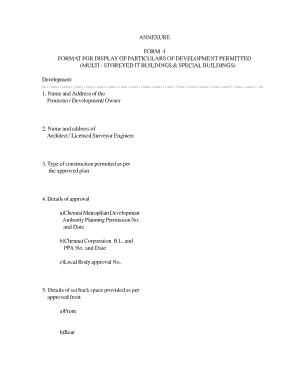
Get Annexure Form -i Format For Display Of ... - Cmda
How it works
-

Open form follow the instructions
-

Easily sign the form with your finger
-

Send filled & signed form or save
How to fill out the ANNEXURE FORM -I FORMAT FOR DISPLAY OF PARTICULARS OF DEVELOPMENT ONLINE
This guide aims to assist users in accurately completing the ANNEXURE FORM -I for the display of particulars related to multi-storeyed IT buildings and special buildings. With clear steps and thoughtful explanations, this guide supports users at every stage of the online form-filling process.
Follow the steps to complete your form accurately.
- Click ‘Get Form’ button to obtain the form and open it in your selected online editor.
- Begin by entering the name and address of the promoter, developer, or owner in the first section. Ensure that this information is complete and accurate.
- In the next field, provide the name and address of the architect, licensed surveyor, or engineer responsible for the project. Verify that all details are correct.
- Specify the type of construction permitted as per the approved plan in the designated section.
- Fill out the details of approval by entering the Chennai Metropolitan Development Authority planning permission number and date, the Chennai Corporation building and planning approval number and date, along with the local body approval number.
- Provide information about the setback space as per the approved front. Complete the fields for front, rear, and both side setbacks.
- Outline the details regarding the number of car parking spaces and two-wheeler parking as approved in the plan.
- Indicate the provision of a transformer in the ground floor as per the approved plans.
- Describe the provisions of a standby generator room and meter room as specified in the approved plans.
- Complete the details regarding lift provisions as per the approved plan.
- Detail the arrangements made for fire safety within the building.
- Outline the provisions for water supply, distinguishing between drinking purposes and other uses.
- Fill in the area of construction and usage for each floor as specified in the approved plans. This information includes basement, ground, first, second, third, fourth, and fifth floors.
- Conclude by obtaining signatures from the owner/promoter/developer of the building, the architect/engineer, and the planning authority of the Chennai Metropolitan Development Authority.
- Once all sections have been completed and verified, you can save changes, download the form, print it for physical submission, or share it as needed.
Start completing your ANNEXURE FORM -I online now for efficient document management.
Industry-leading security and compliance
US Legal Forms protects your data by complying with industry-specific security standards.
-
In businnes since 199725+ years providing professional legal documents.
-
Accredited businessGuarantees that a business meets BBB accreditation standards in the US and Canada.
-
Secured by BraintreeValidated Level 1 PCI DSS compliant payment gateway that accepts most major credit and debit card brands from across the globe.