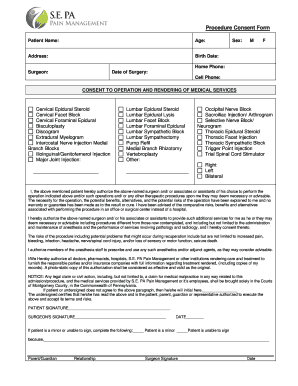
Procedure Consent Form Patient Name: Age: Address: Birth Date: Sex: M F Home Phone: Surgeon: Date of Surgery: Cell Phone: CONSENT TO OPERATION AND RENDERING OF MEDICAL SERVICES Cervical Epidural Steroid.
Open form follow the instructions
Easily sign the form with your finger
Send filled & signed form or save
How to fill out the Procedure Consent Form - SE PA Pain Management online
Filling out the Procedure Consent Form is an important step in your medical journey. This guide provides a clear, step-by-step approach to assist you in completing the form accurately and confidently.
Follow the steps to successfully complete the form.
- Click ‘Get Form’ button to obtain the Procedure Consent Form and open it for editing.
- Fill in your personal details, including patient name, age, address, birth date, and sex. Ensure accuracy as this information is essential for your medical records.
- Provide contacts by entering your home phone and cell phone numbers. This information will be used for any necessary communication regarding your procedure.
- Specify the surgeon's name and the date of surgery. This will help confirm your appointment and the medical professional responsible for your care.
- Indicate the procedure(s) you are consenting to by checking the appropriate boxes or entering details in the provided sections. These include various injection types and surgical procedures related to pain management.
- Indicate the side of the body affected (right, left, or bilateral) for the planned procedure.
- Read the consent statement thoroughly. This explains the procedure, potential risks, benefits, and alternatives. Make sure you understand each part before proceeding.
- Sign the form as the patient or have a parent or guardian sign if applicable. If someone else is signing on your behalf, fill out their relationship to you as well.
- Review all provided information to ensure its accuracy and completeness.
- Once satisfied with the form, you can choose to save your changes, download, print, or share the completed form as needed.
Complete your Procedure Consent Form online today for a smoother healthcare experience.
Experience a faster way to fill out and sign forms on the web. Access the most extensive library of templates available.
Related content
Mar 21, 2012 — Center for Studies of Addiction (M.D.C.), University of Pennsylvania,...
by MD Cheatle · Cited by 48 — Philadelphia, Pennsylvania; Behavioral Medicine Center...
Example of the Prestige Health Choice Medical Record. Review Form is available in the...
Get answers to your most pressing questions about US Legal Forms API.
How do you see if a column is indexed?
To check if index exists on column uses sp_helpindex function or extract information from sys. tables, sys. columns, sys. indexes, sys.
What does it mean when a column is indexed?
An index is a copy of selected columns of data, from a table, that is designed to enable very efficient search. An index normally includes a "key" or direct link to the original row of data from which it was copied, to allow the complete row to be retrieved efficiently.
What happens when you index a column?
What is Indexing? Indexing makes columns faster to query by creating pointers to where data is stored within a database. Imagine you want to find a piece of information that is within a large database. To get this information out of the database the computer will look through every row until it finds it.
What will happen if we place index on all columns?
Creating indexes on all the columns of a table will have the following bad effects: INSERTs to the table will be slower, as all the indexes have to be updated.
Is there an index function in R?
If either operand is case sensitive, then the R-INDEX function is also case sensitive. If either the source string or target pattern is null, the result is 0.
Should I index a column?
In general, you should create an index on a column in any of the following situations: The column is queried frequently. A referential integrity constraint exists on the column. A UNIQUE key integrity constraint exists on the column.
How to index a column in R?
By using the R base bracket notation df[] you can select columns by index position (column number) from R data frame. The df[] notation takes syntax df[rows,columns] , so when using this notation to select columns by index use the columns parameter on the right after the comma.
How to get the data type of a column in R?
The main way to check your data type is to use the function class() . If you have a data frame, another easy way to check data types is to use the str() function. This displays the structure of your data frame and tells you what data type each of your columns is.
How to index row and column in R?
Use the square bracket operator with df[] notation to select rows by index in R, The syntax of this notation is df[rows, columns], replace rows with the index number, index range, or list of index values.
How do I find the index of a column?
The easiest way to get the column index from a column name in Pandas is to use the . get_loc() method. This method returns the integer location of a column in a DataFrame or Series based on its label.
Use professional pre-built templates to fill in and sign documents online faster. Get access to thousands of forms.
If you believe that this page should be taken down, please follow our DMCA take down process here.