Loading
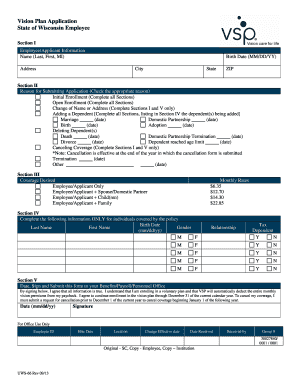
Get State Of Wisconsin Vsp Application Fill Form
How it works
-

Open form follow the instructions
-

Easily sign the form with your finger
-

Send filled & signed form or save
How to fill out the State Of Wisconsin Vsp Application Fill Form online
Filling out the State Of Wisconsin Vsp Application Fill Form online is a straightforward process that ensures your enrollment in the vision plan is seamless. This guide will provide you with detailed instructions to help you complete each section of the form with ease.
Follow the steps to complete your application effectively.
- Click the ‘Get Form’ button to access the application form and open it in your preferred editing tool for online completion.
- In Section I, provide your employee or applicant information. Fill in your name as it appears on official documents (Last, First, MI), your birth date in the format MM/DD/YY, and your full address including city, state, and ZIP code.
- Proceed to Section II, where you must indicate the reason for submitting the application. Check the appropriate box that corresponds to your situation, such as Initial Enrollment, Open Enrollment, or Adding a Dependent, and fill out only the relevant sections as instructed.
- In Section III, specify the coverage desired by selecting one of the options: Employee/Applicant Only, Employee/Applicant + Spouse/Domestic Partner, Employee/Applicant + Child(ren), or Employee/Applicant + Family. Review the monthly rates listed alongside to understand the cost associated with each option.
- If applicable, complete Section IV by providing the necessary information for individuals covered under the policy. Fill out the birth date, last name, first name, gender, relationship, and tax dependency status for each dependent.
- Finally, in Section V, sign and date the form. By signing, you confirm that all provided information is accurate and agree to the enrollment and deduction terms for the vision plan. Submit the completed form to your Benefits/Payroll/Personnel Office.
Complete the State Of Wisconsin Vsp Application Fill Form online today to ensure your enrollment in the vision plan is processed without delay.
The correct format for a numeric ZIP+4 code is five digits, a hyphen, and four digits. The first five digits represent the 5-digit ZIP Code; the sixth and seventh digits (the first two after the hyphen) identify an area known as a sector; the eighth and ninth digits identify a smaller area known as a segment.
Industry-leading security and compliance
US Legal Forms protects your data by complying with industry-specific security standards.
-
In businnes since 199725+ years providing professional legal documents.
-
Accredited businessGuarantees that a business meets BBB accreditation standards in the US and Canada.
-
Secured by BraintreeValidated Level 1 PCI DSS compliant payment gateway that accepts most major credit and debit card brands from across the globe.