Loading
Get Application Form - Prometric
How it works
-

Open form follow the instructions
-

Easily sign the form with your finger
-

Send filled & signed form or save
How to fill out the Application Form - Prometric online
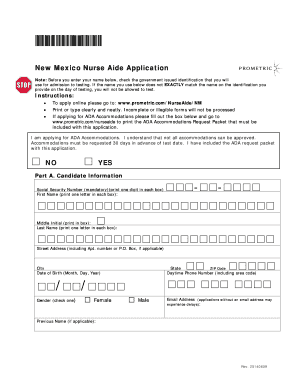
This guide provides step-by-step instructions on completing the Application Form - Prometric for the New Mexico Nurse Aide. By following these instructions, you can ensure that your application is filled out correctly and submitted without issues.
Follow the steps to successfully complete the Application Form - Prometric.
- Click ‘Get Form’ button to obtain the application form and open it in your preferred digital editor.
- Begin by entering your personal information in Part A, including your Social Security Number, first name, middle initial, last name, street address, city, state, ZIP code, date of birth, daytime phone number, gender, email address, and previous name if applicable. Ensure the information matches your identification for testing.
- Proceed to Part B to indicate your eligibility route by selecting the appropriate option for your situation. Make sure to refer to the route explanations if needed.
- In Part C, if applicable, provide work verification information. This section must be filled out by an authorized facility representative for those employed or offered employment by a Medicaid-certified nursing facility.
- Complete Part D by entering details of your training verification, required if applying through specified routes. Enter the training program code, completion date, program name, mailing address, and confirm the program director's or instructor’s signature.
- Move to Part E to select your test site and pay the required fees. Check the site code for your selected test site and choose whether you are self-paying or state-paying for the exam. Be sure to calculate the total fee accurately and include that in your payment information.
- In the Candidate Release Statement section, read and understand all statements. Sign and date the application to confirm your agreement with the terms laid out.
- Finally, review all entries for accuracy. Users can save changes to the completed form, download a copy for their records, print it for mailing or sharing, and then proceed to submit the form as instructed.
Start filling out your Application Form - Prometric online today to secure your testing appointment.
How To Access First time testers – click on First Time Registration. ... Click on continue. Click on I Agree. Fill in registration form following online instructions and click submit. Click on continue. Click on Take Test. Click – Submit under Public Tests. Click on Practice Test Title.