Loading
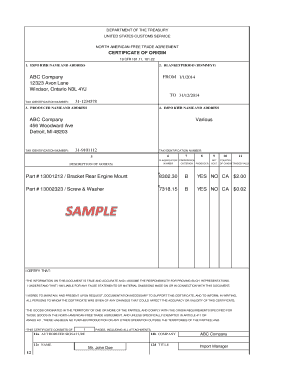
Get Nafta Form Sample (pdf, 28 Kb)
How it works
-

Open form follow the instructions
-

Easily sign the form with your finger
-

Send filled & signed form or save
How to use or fill out the NAFTA Form Sample (PDF, 28 KB) online
Filling out the NAFTA Form Sample is a crucial step for businesses engaged in trade between the United States, Canada, and Mexico. This guide provides a clear, step-by-step approach to completing the form online, ensuring users have all the necessary information to fill it accurately.
Follow the steps to successfully complete the NAFTA Form Sample online.
- Press the ‘Get Form’ button to acquire the form. This will allow you to access it in an online editor where you can start filling it out.
- In section 1, enter the name and address of the exporter. Make sure to include the tax identification number for accurate processing.
- For section 2, specify the blanket period. Input the start and end dates in the format DD/MM/YY.
- Move to section 3, where you will fill in the producer's name and address. Again, include the tax identification number where required.
- In section 4, provide the importer’s name and address, ensuring all details are correct and complete.
- Section 5 requires an entry for the description of goods. List each item clearly along with its country of origin.
- For section 6, classify the goods. Enter the appropriate classification number as per trade regulations.
- In section 7, indicate whether the goods meet the criteria for preferential treatment by marking 'YES' or 'NO'.
- Complete sections 8 through 10, which include costs associated with each item, ensuring accuracy in the amounts stated.
- Lastly, in section 12, the authorized individual must sign and date the form. Include their name, title, and telephone number as required.
- Once all the sections are filled out, you can save your changes, download the completed form, print it, or share it as needed.
Start filling out the NAFTA Form Sample online today to ensure compliance and facilitate your trade activities.
What makes a good index? be arranged in alphabetical order. include accurate page references that lead to useful information on a topic. avoid listing every use of a word reor phrase. be consistent across similar topics. use sub-categories to break up long blocks of page numbers. use italics for publications and Acts.