Loading
Get United Contractor Form- Conditional Waiver On Progress Payment ...
How it works
-

Open form follow the instructions
-

Easily sign the form with your finger
-

Send filled & signed form or save
How to fill out the United Contractor Form - Conditional Waiver On Progress Payment online
This guide provides a clear and user-friendly approach to completing the United Contractor Form - Conditional Waiver On Progress Payment online. Understanding each component of the form is essential for ensuring accurate submission and compliance with payment requirements.
Follow the steps to complete the form effectively.
- Click the ‘Get Form’ button to access the form and open it in your preferred editor.
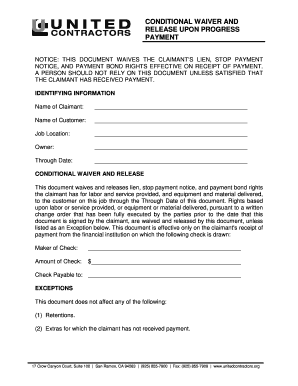
- Fill in the identifying information section. Enter the name of the claimant, the name of the customer, the job location, the owner's name, and the through date for which the waiver is applicable.
- Complete the conditional waiver and release section. This part requires the details related to the payment and the services provided up to the through date. Be sure to include the maker of the check, the amount of the check, and to whom the check is payable.
- If applicable, list any exceptions in the dedicated section. This helps clarify any retentions, extras not paid, previously waivered payments without receipt of payment, and any contract rights you are asserting.
- Sign and date the document in the signature section. Ensure that you include your title alongside your signature to validate the waiver.
- After completing the form, you can save your changes, download a copy for your records, print the document for hard copies, or share it with the necessary parties.
Complete your documents online today for effective management!
The Unconditional Waiver and Release on Final Payment form is used when the claimant is required to execute a waiver in exchange for a final payment, and the claimant acknowledges that final payment has been received.