Loading
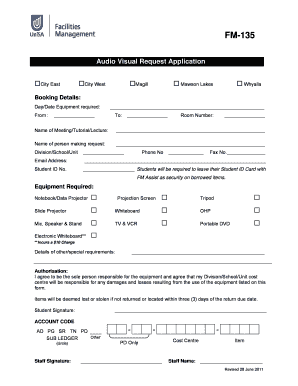
Get Fm135 - Audio Visual Request Form
How it works
-

Open form follow the instructions
-

Easily sign the form with your finger
-

Send filled & signed form or save
How to fill out the FM135 - Audio Visual Request Form online
The FM135 - Audio Visual Request Form is essential for requesting audio-visual equipment for your meetings, tutorials, or lectures. This guide will provide you with clear and detailed instructions on how to complete the form efficiently online.
Follow the steps to fill out the FM135 form with ease.
- Click the ‘Get Form’ button to access the form and open it in the editor.
- Begin by entering the booking details. Fill in the 'Day/Date Equipment Required' section, specifying the date along with the time range by indicating 'From' and 'To'.
- Next, provide the 'Room Number' where the equipment will be used and the 'Name of Meeting/Tutorial/Lecture' clearly.
- In the requester details section, enter your name, followed by your 'Division/School/Unit', 'Phone No', 'Fax No', and 'Email Address'. If applicable, include your 'Student ID No'. Remember that students must leave their Student ID card as security for borrowed items.
- For 'Equipment Required', indicate the specific equipment you need by checking the boxes next to options such as 'Notebook/Data Projector', 'Slide Projector', and others listed. Note that certain items may incur a charge, indicated by footnotes.
- Consider any additional requirements in the 'Details of other/special requirements' section, providing any necessary information regarding what you need.
- Move on to the 'Authorisation' section where you must agree to take responsibility for the equipment. Sign and date accordingly to validate your request.
- If you are a staff member completing the form, fill out the 'Cost Centre', 'Item', and 'Staff Name' at the bottom, if necessary.
- Finally, ensure all information is accurate, then save changes, download, print, or share the completed form as needed.
Complete your FM135 - Audio Visual Request Form online today to ensure you have the necessary equipment for your events.
Use file watch (Experimental) Docker Scout (Early Access) expand_more. Image details view. Image analysis. Advisory database.
Industry-leading security and compliance
US Legal Forms protects your data by complying with industry-specific security standards.
-
In businnes since 199725+ years providing professional legal documents.
-
Accredited businessGuarantees that a business meets BBB accreditation standards in the US and Canada.
-
Secured by BraintreeValidated Level 1 PCI DSS compliant payment gateway that accepts most major credit and debit card brands from across the globe.