Loading
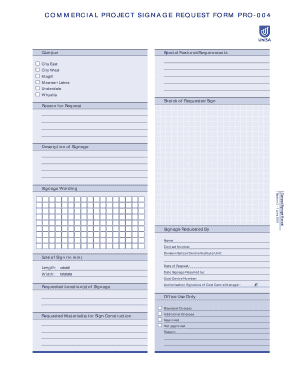
Get Commercial Project Signage Request Form Pro-004
How it works
-

Open form follow the instructions
-

Easily sign the form with your finger
-

Send filled & signed form or save
How to fill out the COMMERCIAL PROJECT SIGNAGE REQUEST FORM PRO-004 online
This guide provides detailed instructions on how to complete the Commercial Project Signage Request Form PRO-004 online. By following these steps, you can ensure that your signage requests are processed efficiently and accurately.
Follow the steps to complete the form accurately.
- Click ‘Get Form’ button to obtain the form and open it in the editor.
- Begin by filling out the 'Campus' section. Indicate the relevant campus where the signage will be located, selecting from options like City East, City West, Magill, Mawson Lakes, Underdale, or Whyalla.
- In the 'Special Features/Requirements' section, provide any specific details that need to be included for your signage, such as design elements or materials.
- Upload a 'Sketch of Requested Sign' if applicable. This visual aid will help illustrate your request.
- State the 'Reason for Request' clearly. Explain why the signage is needed to assist in processing your request.
- Fill out the 'Description of Signage' field with details about what the sign should convey in terms of information.
- Enter the 'Signage Wording' that should appear on the sign. Be precise to ensure the message is communicated effectively.
- Provide your personal information in the 'Name' and 'Contact Number' fields. This allows the processing team to reach you if there are questions or updates.
- Identify your 'Division/School/Centre/Institute/Unit' to attribute the request accurately.
- Specify the size of the sign in millimeters, entering the 'Length' and 'Width' directly in the provided fields.
- Input the 'Date of Request' and the 'Date Signage Required by' to clarify your timeline.
- Include the 'Cost Centre Number' assigned to your division to ensure proper billing.
- List the 'Requested Location(s) of Signage.' Indicate where exactly the signage is to be displayed.
- Ensure the 'Authorisation Signature of Cost Centre Manager' is obtained if required, since this approval may be necessary for processing.
- After reviewing the information filled out, you can save changes, download, print, or share the form for submission.
Complete your signage requests efficiently by filling out the form online today.
Industry-leading security and compliance
US Legal Forms protects your data by complying with industry-specific security standards.
-
In businnes since 199725+ years providing professional legal documents.
-
Accredited businessGuarantees that a business meets BBB accreditation standards in the US and Canada.
-
Secured by BraintreeValidated Level 1 PCI DSS compliant payment gateway that accepts most major credit and debit card brands from across the globe.