Loading
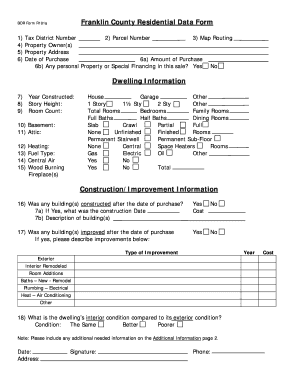
Get Franklin County Residential Data Form - Franklin County Auditor
How it works
-

Open form follow the instructions
-

Easily sign the form with your finger
-

Send filled & signed form or save
How to fill out the Franklin County Residential Data Form - Franklin County Auditor online
This guide will assist you in completing the Franklin County Residential Data Form online, ensuring you provide all necessary information accurately. Whether you are a first-time user or familiar with the process, our clear step-by-step instructions will lead you through each section of the form.
Follow the steps to effectively complete the form online.
- Click ‘Get Form’ button to obtain the form and open it in the editor.
- Provide the tax district number in the designated field. This number is typically available on property documentation.
- Enter the parcel number accurately. Ensure that this number corresponds with the property you are submitting data for.
- Fill in the map routing information for the property. This helps in identifying the exact location.
- List the property owner(s) in the appropriate section, ensuring all names are spelled correctly.
- Input the full property address, including street number, street name, city, and ZIP code.
- Document the date of purchase for the property in the specified field.
- Indicate the amount of purchase in the relevant field for clarity.
- Specify if there was any personal property or special financing associated with this sale by selecting 'Yes' or 'No'.
- In the dwelling information section, enter the year constructed of the property.
- Provide the story height of the dwelling, such as 1 story, 1½ story, or 2 stories.
- Count the total number of rooms and enter it in the designated area.
- Detail the type of basement available (e.g., full, partial, slab, crawl) and any relevant information regarding the attic.
- Complete the heating information section by denoting the type of heating in use.
- Fill in the fuel type used for heating as applicable, along with any details about central air, wood burning, or fireplaces.
- If any buildings were constructed after the date of purchase, select 'Yes' and provide the construction date and description.
- Indicate whether any improvements were made after the date of purchase. If yes, please describe them in the provided fields.
- Evaluate the dwelling’s interior condition compared to its exterior condition by selecting the appropriate option.
- Finally, provide any additional information in the space provided and sign and date the form. Include your phone number for contact purposes.
- Once you have filled out all sections accurately, you can choose to save changes, download, print, or share the form as needed.
Complete your Franklin County Residential Data Form online today!
Appraised values should equal 100% of market value. However, assessed values in Ohio – the amounts on which property taxes are based – are calculated at 35% of appraised value. So, for example, if your property is worth $100,000, your assessed value should be $35,000.