Loading
Get The Rotary Foundation Contribution Form - Clubrunner - Clubrunner
How it works
-

Open form follow the instructions
-

Easily sign the form with your finger
-

Send filled & signed form or save
How to fill out the THE ROTARY FOUNDATION CONTRIBUTION FORM - ClubRunner - Clubrunner online
This guide provides a step-by-step approach to completing the Rotary Foundation Contribution Form online. By following these instructions, you will ensure that your contributions reach the intended destinations efficiently and accurately.
Follow the steps to complete the contribution form
- Click ‘Get Form’ button to obtain the form and open it in your document editor.
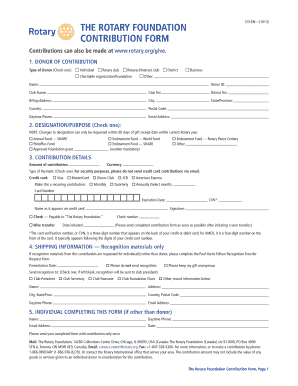
- Fill in the donor information by selecting the type of donor from the provided options: individual, Rotary club, Rotaract/Interact club, charitable organization/foundation, district, business, or other. Include your donor ID, name, club name, club number, district number, and billing address, including city, state/province, country, and postal code. Provide your daytime phone number and email address.
- Designate the purpose of your contribution by checking one of the available options in the Designation/Purpose section. Remember that changes to the designation can only be requested within 90 days of the gift receipt date for the current Rotary year.
- Provide the details of your contribution. Specify the amount and select the currency. Choose a type of payment: credit card (Visa, MasterCard, Diners Club, JCB, or American Express) or check. If paying by credit card, fill in your card number, expiration date, name as it appears on the card, and CVN. If making a check payment, indicate that the check is payable to 'The Rotary Foundation.'
- For those wishing to make a recurring contribution, select the frequency of the contribution (monthly, quarterly, or annually) and specify the month if applicable.
- Complete the shipping information section if you request recognition materials. Specify if you wish to keep your gift anonymous and indicate the recipient for recognition materials, which may go to the club president, secretary, treasurer, or foundation chair.
- If someone other than the donor is completing the form, fill in the name, daytime phone number, email address, and date in the section for the individual completing the form.
- Review all the entered information for accuracy before submitting the completed form. You can then save any changes, download, print, or share the form as needed.
Start filling out your contribution form online today to support The Rotary Foundation.
Contributions to any club or district charitable fund that has obtained tax exemption under Section 501(c)(3) of the Internal Revenue Code may be tax deductible as charitable contributions. Membership dues may be deductible for some Rotarians as business expenses.
Industry-leading security and compliance
US Legal Forms protects your data by complying with industry-specific security standards.
-
In businnes since 199725+ years providing professional legal documents.
-
Accredited businessGuarantees that a business meets BBB accreditation standards in the US and Canada.
-
Secured by BraintreeValidated Level 1 PCI DSS compliant payment gateway that accepts most major credit and debit card brands from across the globe.