Loading
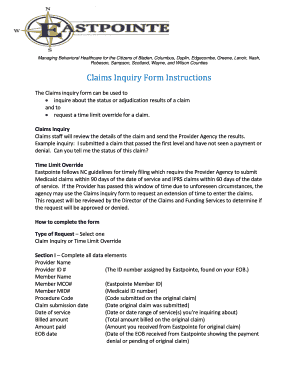
Get Claims Inquiry Form Instructions - Eastpointe.net - Eastpointe
How it works
-

Open form follow the instructions
-

Easily sign the form with your finger
-

Send filled & signed form or save
How to fill out the Claims Inquiry Form Instructions - Eastpointe.net - Eastpointe online
This guide provides clear instructions on how to complete the Claims Inquiry Form for Eastpointe. It is designed to help users understand the process of inquiring about claims and requesting time limit overrides in a user-friendly manner.
Follow the steps to complete your claims inquiry form effectively.
- Click ‘Get Form’ button to obtain the claims inquiry form and open it for editing.
- Select the type of request you are making: either 'Claim Inquiry' or 'Time Limit Override'. Ensure you choose the correct option based on your situation.
- In Section I, fill out all the required data fields including your provider name, provider ID number, member name, member MCO number, member Medicaid ID number, procedure code, claim submission date, date of service, billed amount, amount paid, and the EOB date.
- Proceed to Section II and check the appropriate reason for your claim inquiry. This might include options like overpayment, underpayment, full recoupment, or Coordination of Benefits (COB), as well as an 'other' option for different reasons.
- In Section III, provide detailed information regarding your inquiry or override request. It is essential to include as much relevant detail as possible and attach any supporting documentation, especially for override requests.
- Complete Section IV by entering your printed name, job title, the date, and your contact information including phone number, fax number, and email address.
- After filling out the form, review all entries for accuracy. You can then save changes, download, print, or share the completed form as needed.
- Finally, mail the request along with any supporting documents to Eastpointe Human Services at the address provided or fax them to the Claims Supervisor.
Complete your Claims Inquiry Form online today and ensure your inquiries are addressed promptly.
Every member we help is ultimately an investment in the health of our 10-county service area: Duplin, Edgecombe, Greene, Lenoir, Robeson, Sampson, Scotland, Warren, Wayne and Wilson counties.
Industry-leading security and compliance
US Legal Forms protects your data by complying with industry-specific security standards.
-
In businnes since 199725+ years providing professional legal documents.
-
Accredited businessGuarantees that a business meets BBB accreditation standards in the US and Canada.
-
Secured by BraintreeValidated Level 1 PCI DSS compliant payment gateway that accepts most major credit and debit card brands from across the globe.