Loading
Get Nycers Membership Application - Nycmea.org - Osaunion
How it works
-

Open form follow the instructions
-

Easily sign the form with your finger
-

Send filled & signed form or save
How to fill out the NYCERS Membership Application online
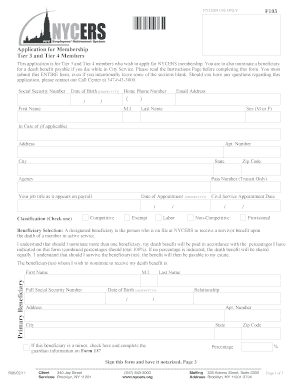
This guide provides users with step-by-step instructions on completing the NYCERS Membership Application for Tier 3 and Tier 4 members. The process is designed to be straightforward, ensuring you can efficiently submit your application online.
Follow the steps to complete your NYCERS membership application online.
- Click ‘Get Form’ button to obtain the application form and access it in the online editor.
- Begin by entering your social security number and date of birth in the appropriate fields. Ensure that the format for the date is MM/DD/YYYY.
- Provide your home phone number, first name, middle initial, last name, and preferred email address in the designated sections.
- Indicate your sex using 'M' for male or 'F' for female, and input your address details, including apartment number, city, state, and zip code.
- Fill in your agency name and pass number, if applicable, alongside your job title as listed on payroll.
- Enter the date of your appointment and select your classification by checking the appropriate box from the options provided (competitive, exempt, non-competitive, provisional, labor).
- Nominate your beneficiary by providing their full name, social security number, date of birth, and relationship to you. Complete their address details as well.
- If nominating more than one beneficiary, ensure that the percentages add up to 100%. If a beneficiary is a minor, check the specified box to indicate and follow instructions for providing guardian information.
- Complete the family information section by entering your mother’s maiden name.
- If you have prior service with another retirement system, provide the name of that system, period of membership, and membership number if you know it.
- If applicable, enter your military service dates, specifying 'From' and 'To' within the format of MM/DD/YYYY.
- Review all entries for accuracy and completeness before signing the form in front of a Notary Public or Commissioner of Deeds.
- Ensure you submit all pages of the form, and do not attempt to make erasures or use white-out, as this may invalidate your application.
- Upon completion, you can save any changes made to your application, and download or print the final version for your records.
Begin your NYCERS Membership Application online now!
How to Register for MyNYCERS Step 1 – Go to .MyNYCERS.org. Click the Register button to begin. Step 2 – Tell Us Who You Are. ... Step 3 – Verify your Identity. ... Step 4 – Verify Contact Information. ... Step 5 – Create Your Login Credentials. ... Step 6 – Log In. ... Step 7 – Two-Factor Authentication.
Industry-leading security and compliance
US Legal Forms protects your data by complying with industry-specific security standards.
-
In businnes since 199725+ years providing professional legal documents.
-
Accredited businessGuarantees that a business meets BBB accreditation standards in the US and Canada.
-
Secured by BraintreeValidated Level 1 PCI DSS compliant payment gateway that accepts most major credit and debit card brands from across the globe.