Loading
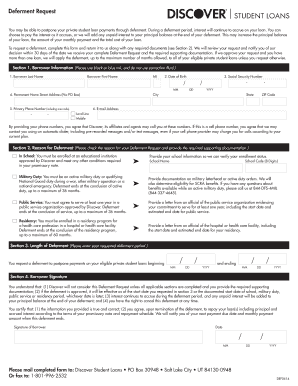
Get Discover Student Loans Deferment Form
How it works
-

Open form follow the instructions
-

Easily sign the form with your finger
-

Send filled & signed form or save
How to fill out the Discover Student Loans Deferment Form online
This guide provides a comprehensive overview of how to complete the Discover Student Loans Deferment Form online. By following these instructions, users can efficiently navigate the process and ensure all necessary information is correctly submitted.
Follow the steps to complete the form with ease.
- Click the ‘Get Form’ button to acquire the Discover Student Loans Deferment Form and open it in your preferred document editor.
- In Section 1, fill in your borrower information. Provide your last name, first name, middle initial, date of birth, social security number, primary phone number, and email address. Ensure you use black or blue ink if printing.
- Indicate your permanent home street address in the specified field, avoiding the use of a P.O. Box.
- Proceed to Section 2, where you will check the reason for your deferment request. Choose from options such as being in school, military duty, public service, or residency. Each reason has specific documentation requirements that you must include with your form.
- In Section 3, specify the desired length of your deferment by entering the start and end dates of the deferment period.
- Sign and date the form in Section 4. By signing, you acknowledge the terms outlined and certify that the information provided is accurate.
- Once completed, review the form to ensure all sections are filled and required documentation is attached. Save your changes, and choose to download, print, or share the form as needed.
Complete your Discover Student Loans Deferment Form online today for a streamlined process.
There are various circumstances when it may be a good option to defer a student loan. Depending on the type of federal student loan, you may not have to pay the interest that accrues during the deferment period. ... This student loan deferment lasts during enrollment and for six months after enrollment ends.