Loading
Get Sodastream Rebate
How it works
-

Open form follow the instructions
-

Easily sign the form with your finger
-

Send filled & signed form or save
How to fill out the Sodastream Rebate online
This guide provides clear instructions for users on how to fill out the Sodastream Rebate form online. By following these steps, you can submit your request for a rebate easily and effectively.
Follow the steps to complete your rebate form.
- Click ‘Get Form’ button to obtain the form and open it in the editor.
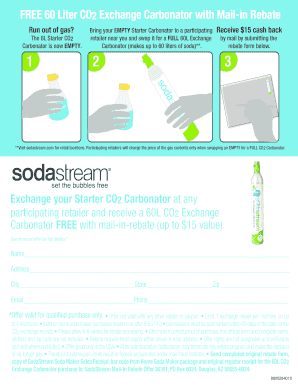
- Enter your personal details in the designated fields. This includes your name, address, city, state, and zip code. Ensure that all information is accurate to avoid processing delays.
- Provide your email address and phone number. This information may be used for rebate processing updates.
- Review the terms of the offer carefully. Make sure that your purchase qualifies for the rebate, as outlined in the provided terms.
- Prepare to submit your completed form with the required documents. This includes a copy of your SodaStream Soda Maker sales receipt, the barcode from the Home Soda Maker package, and the original register receipt for the 60L CO2 exchange Carbonator purchase.
- Double-check all information for accuracy and completeness. Ensure that you have included your correct address, proof of purchase, and that you adhere to the submission guidelines.
- Once you have completed the form and gathered all necessary documents, save your changes. You may also download or print the form for your records.
- Follow any additional instructions provided on the form for mailing your completed rebate request to the designated address.
Complete your Sodastream Rebate form online today and enjoy the benefits of your rebate!
When a CO2 cylinder is used up, you can simply exchange it for a full one at a SodaStream retail location. The store returns the empty carbonating cylinders to SodaStream to be cleaned, inspected, and refilled with beverage-grade CO2 for the very best of drinks.