Loading
Get Ycmou Online Exam
How it works
-

Open form follow the instructions
-

Easily sign the form with your finger
-

Send filled & signed form or save
How to fill out the Ycmou Online Exam online
This guide will assist users in accurately completing the Ycmou Online Exam form. Follow the detailed instructions below to ensure you provide all necessary information correctly and efficiently.
Follow the steps to successfully complete the Ycmou Online Exam form
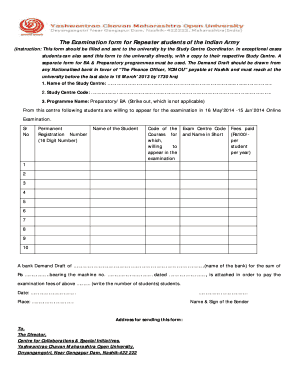
- Press the ‘Get Form’ button to access the Ycmou Online Exam form and open it in your document editor.
- Begin by entering the name of the Study Centre in the designated field.
- Next, input the Study Centre Code, ensuring it is accurate.
- Select the Programme Name by indicating either ‘Preparatory’ or ‘BA’, and strike out the option that does not apply.
- List the students who wish to appear for the examination, entering their permanent names and corresponding registration numbers in the provided columns.
- For each student, input the Code of the Exam Centre.
- Indicate the courses for which the students are willing to appear in the examination.
- Enter the fees paid, which is Rs 100 per student per year.
- Prepare a Demand Draft from a Nationalised bank, filling in the required fields including the name of the bank, amount, machine number, and date.
- Count the number of students and write this total in the respective field of the form.
- Date and sign the form, providing your name and address for submission.
- Finally, ensure the form is sent to the Director, Centre for Collaborations & Special Initiatives, at the provided address, or through the Study Centre Coordinator.
Complete your documents online today for a smoother examination process.
username or PRN or Email. Choose Username or Email and enter these details as per your selection. Then enter Date of Birth and Mother's First Name. Click on submit option and follow the process guided to retrieve your 16 digit PRN Number.