Loading
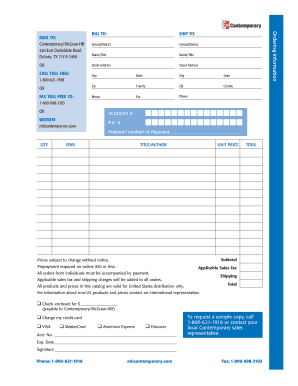
Get Print Pdf Order Form - Glencoe
How it works
-

Open form follow the instructions
-

Easily sign the form with your finger
-

Send filled & signed form or save
How to fill out the Print PDF Order Form - Glencoe online
Filling out the Print PDF Order Form - Glencoe online can streamline your ordering process for educational materials. This guide provides a detailed walkthrough of each section to ensure a smooth experience for all users, regardless of their prior experience with such forms.
Follow the steps to complete the Print PDF Order Form - Glencoe online.
- Press the ‘Get Form’ button to access the Print PDF Order Form - Glencoe and open it in your preferred editor.
- Begin by filling out the 'Ship To' section. Input the name of the school or district in the designated fields, along with the contact name and title. Provide the complete street address, city, state, zip code, and county. Fill in the phone number and fax number as needed.
- Next, move to the 'Bill To' section. This may be the same as the shipping address or an alternative billing location. Enter the relevant information as required.
- In the 'Ordering Information' section, indicate your preferred method of shipment. List the quantity of items you wish to order, and enter the ISBN, title, and author for each item. Include the unit price for each entry to calculate the subtotal.
- Review the applicable sales tax and shipping charges, which will be added to your total order amount. Ensure that you calculate these correctly to avoid any discrepancies.
- In the payment section, choose your preferred payment method. You can opt for check or credit card payment. If using a card, fill in the account number and expiration date. Remember to sign where indicated.
- After completing all required sections, confirm that all information is accurate. You can then save your changes, download the completed form, print it for personal records, or share it as needed.
Complete your document online today to streamline your order process!
There is a chance that your printer driver is outdated, and that can cause PDF printing problems. Most modern computers have an update center that will notify you when you need to update your printer driver. You might also try searching for updated printer drivers on your printer manufacturer's website.