Loading
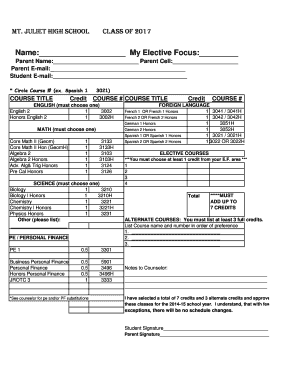
Get 10th Grade Registration Form - Mount Juliet High School
How it works
-

Open form follow the instructions
-

Easily sign the form with your finger
-

Send filled & signed form or save
How to fill out the 10th Grade Registration Form - Mount Juliet High School online
The 10th Grade Registration Form for Mount Juliet High School is an essential document that allows students to select their courses for the upcoming school year. This guide will assist users in accurately completing the form online, ensuring that all necessary information is provided.
Follow the steps to successfully complete your registration form online.
- Press the ‘Get Form’ button to access the 10th Grade Registration Form. This will open the document in your editing interface.
- Begin by filling in your name and elective focus in the designated fields. Ensure accuracy, as this information is crucial for your registration.
- In the section for parental information, input the parent or guardian's name, cell number, and email address. This allows the school to communicate important information regarding your registration.
- Next, provide your email address in the specified area. This will serve as a point of contact for any updates or communication from the school.
- Proceed to select your English course. Choose one option from the English section and circle the corresponding course number.
- Move on to the Math section, where you must select one course by circling the appropriate course title and number.
- In the Science section, choose one course from the available options and circle the corresponding course number.
- For Physical Education or Personal Finance, select the desired option and circle the appropriate course number. Consult a counselor if substitutions are needed.
- Select your Foreign Language course by circling one of the options provided, including the course number.
- For Elective Courses, choose at least one credit from your elective focus area and ensure that your total adds up to 7 credits from all selected sections.
- List at least three alternate courses in order of preference in the space provided, including the course names and numbers.
- If you have any special notes to share with the counselor, please complete the notes section.
- Finally, sign the form to approve your course selections and have your parent or guardian sign as well.
- Once all information is entered, save your changes, and you may choose to download, print, or share the completed form as needed.
Complete your 10th Grade Registration Form online today to secure your courses!
The Tennessee Department of Education has raised standards and aligned graduation requirements to best prepare students for college and the workforce. Following the implementation of the Tennessee Diploma Project in 2009, high school students must complete 22 credits to graduate.
Industry-leading security and compliance
US Legal Forms protects your data by complying with industry-specific security standards.
-
In businnes since 199725+ years providing professional legal documents.
-
Accredited businessGuarantees that a business meets BBB accreditation standards in the US and Canada.
-
Secured by BraintreeValidated Level 1 PCI DSS compliant payment gateway that accepts most major credit and debit card brands from across the globe.