Loading
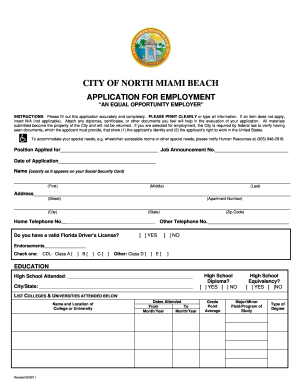
Get Employmentapplication05032011.doc
How it works
-

Open form follow the instructions
-

Easily sign the form with your finger
-

Send filled & signed form or save
How to fill out the EmploymentApplication05032011.doc online
Completing the EmploymentApplication05032011.doc online is a straightforward process. This guide provides step-by-step instructions to help you accurately fill out the application and submit it smoothly.
Follow the steps to successfully complete your employment application.
- To begin, click the ‘Get Form’ button to access the EmploymentApplication05032011.doc and open it in your online editor.
- Fill in the position applied for and the job announcement number prominently at the top of the form. This helps the employer identify your application quickly.
- Provide the date of your application, ensuring it is clear and accurate.
- Clearly print or type your name as it appears on your Social Security card, ensuring each part (first, middle, last) is separated appropriately.
- Fill out your complete address, including street, apartment number (if applicable), city, state, and zip code.
- Enter your home and other telephone numbers to ensure your contactability.
- Indicate whether you hold a valid Florida driver’s license by selecting 'YES' or 'NO' and check the appropriate endorsements if applicable.
- Proceed to the education section by listing the high school attended, along with the city and state. Specify if you hold a diploma or equivalency.
- Continue by listing any colleges or universities attended, including the dates, grade point average, major field of study, and type of degree earned.
- In the employment section, list all job experiences chronologically, starting with your most recent job. For each position, provide complete information including employer, job title, dates of employment, hours worked, job duties, and reasons for leaving.
- Indicate if you may be contacted by your present employer regarding your record of employment.
- Complete the clerical abilities section if relevant, detailing your typing and shorthand capabilities.
- Explain your qualifications for the applied position clearly in your own words, covering special skills and experiences.
- Fill in the military section if applicable, providing details of your service such as branch, dates of service, and discharge status.
- Answer questions regarding past employment with the City of North Miami Beach, relationship to city employees, and any criminal convictions if applicable.
- List three references who can speak to your qualifications, including their contact information.
- Finally, read the application certification section carefully before signing and dating the application.
- Once you have completed the application, save your changes, and ensure you download, print, or share the document as necessary.
Start completing your EmploymentApplication05032011.doc online today for a smooth application process.
A team charter is a project document that outlines why the team has been brought into the project, what the team is being tasked to accomplish and the resources and constraints in which the team will be working.