Loading
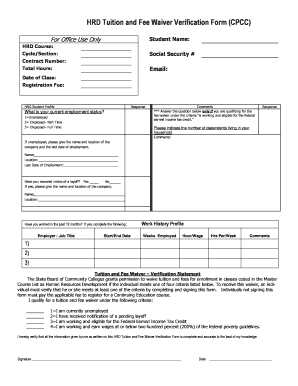
Get Hrd Tuition And Fee Waiver Verification Form (cpcc) For Office Use Only Student Name: Hrd Course
How it works
-

Open form follow the instructions
-

Easily sign the form with your finger
-

Send filled & signed form or save
How to fill out the HRD Tuition And Fee Waiver Verification Form (CPCC) For Office Use Only Student Name: HRD Course online
Filling out the HRD Tuition And Fee Waiver Verification Form is an important step for students seeking financial assistance for their education. This guide provides clear and detailed instructions to help you complete the form accurately and efficiently.
Follow the steps to complete the HRD Tuition And Fee Waiver Verification Form.
- Click ‘Get Form’ button to obtain the form and open it for completion.
- Fill in your name in the 'Student Name' section. Ensure that it matches your legal name to avoid any confusion.
- In the 'HRD Course' field, enter the specific HRD course you are enrolling in. Be sure to write this accurately.
- Complete the 'Cycle/Section'. This may refer to different course cycles or sections for tracking purposes; fill this with the relevant information.
- Enter your Social Security number in the designated field to help verify your identity.
- Provide your Contract Number, this is typically assigned upon your registration.
- Fill in the 'Total Hours' field with the total number of credit hours for your course.
- Input your email address, ensuring it is current and accessible for communication.
- Indicate the 'Date of Class' to clarify when the course will commence.
- Fill out the 'Registration Fee' section with the corresponding fee amount.
- Answer the employment status question by selecting the appropriate option (1, 2, or 3) based on your current situation.
- If qualifying for a fee waiver due to federal earned income tax credit, respond to the subsequent question about dependents.
- If you are unemployed, provide the name and location of the last employer along with your last date of employment.
- Indicate whether you have received notice of a layoff and provide the company details if applicable.
- List any work experience from the past 12 months, providing details about employers, job titles, dates of employment, wages, hours worked per week, and any relevant comments.
- Check one of the criteria for the tuition waiver. Ensure you meet one and signify by selecting the relevant number (1-4).
- Finally, review all information for accuracy before signing and dating the form to conclude your submission.
- Once completed, save your changes, and choose to download, print, or share the form as required.
Complete your form online today to take the next step towards your educational goals.
One way that using bullets can badly misfire is when the author uses them to present an argument.
Industry-leading security and compliance
US Legal Forms protects your data by complying with industry-specific security standards.
-
In businnes since 199725+ years providing professional legal documents.
-
Accredited businessGuarantees that a business meets BBB accreditation standards in the US and Canada.
-
Secured by BraintreeValidated Level 1 PCI DSS compliant payment gateway that accepts most major credit and debit card brands from across the globe.