Loading
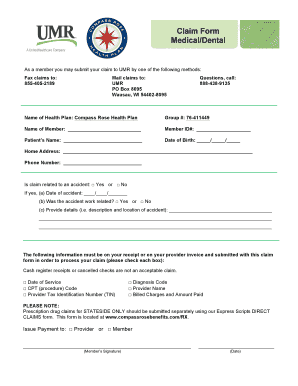
Get Po Box 8095 Wausau Wi 54402
How it works
-

Open form follow the instructions
-

Easily sign the form with your finger
-

Send filled & signed form or save
How to fill out the Po Box 8095 Wausau Wi 54402 online
Filling out the Po Box 8095 Wausau WI 54402 claim form online can streamline the process of submitting your medical or dental claims. This guide provides step-by-step instructions to help you navigate the form effectively.
Follow the steps to fill out the claim form accurately.
- Click ‘Get Form’ button to obtain the claim form and open it in the appropriate editor.
- Enter the name of the health plan in the designated section, which is Compass Rose Health Plan.
- Fill in your group number, which is 76-411449, in the specified field.
- Provide your name in the 'Name of Member' section, followed by your member ID number.
- In the 'Patient’s Name' field, enter the name of the patient receiving medical services.
- Input the patient’s date of birth in the format of day, month, and year.
- Complete the 'Home Address' section with your current residential address.
- Enter your phone number in the provided field.
- Indicate if the claim is related to an accident by selecting 'Yes' or 'No' and fill out the additional fields if applicable.
- Ensure to include the required information from your receipt or provider invoice as listed, checking each box for items like Date of Service and CPT Code.
- Select whether the payment should be issued to the provider or the member.
- Sign and date the form where indicated to complete your submission.
- Once all sections are completed, save your changes, download, print, or share the form as needed.
Start filling out your documents online today for a seamless and efficient process.
Compass Rose | John Stewart Company.