Loading
Get Vodafone Fax
How it works
-

Open form follow the instructions
-

Easily sign the form with your finger
-

Send filled & signed form or save
How to fill out the Vodafone Fax online
Filling out the Vodafone Fax is a straightforward process that allows you to request changes to your mobile plan effectively. This guide will help you navigate each section of the form and ensure all necessary information is provided.
Follow the steps to complete the Vodafone Fax online.
- Click ‘Get Form’ button to obtain the Vodafone Fax form and open it in your preferred editing tool.
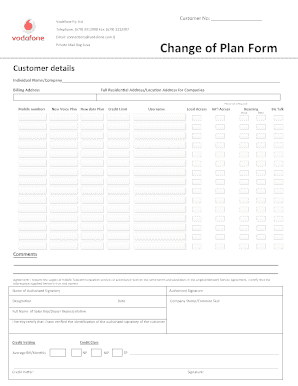
- In the 'Customer details' section, enter your full individual name or company name as applicable. Ensure the information is accurate as it is critical for your account.
- Provide your complete billing address, including the full residential address or location address for companies. This will help in proper account verification and communication.
- Tick the appropriate boxes for your new mobile voice plan and new data plan options. Ensure you select the plans that best fit your needs.
- Indicate your preferred credit limit by filling in the appropriate field. This limits the charges that can be applied to your account based on your selection.
- Fill in your username in the designated field, as it facilitates identification and account management.
- Indicate your preferences for local and international access, roaming, voice, and data services by marking the relevant fields.
- In the 'Comments' section, provide any additional information or requests regarding your plan or needs.
- Review the agreement statement confirming your request for the supply of mobile telecommunication services per the terms of the original Network Service Agreement. Ensure you understand your commitment.
- Sign the document using the name of the authorized signatory, and provide their authorized signature alongside their designation and the date.
- If applicable, attach the company stamp or common seal to authenticate the form.
- Fill in the full name of the sales representative or dealer representative for record-keeping.
- For credit vetting, provide details on your average monthly bill and select your credit class by marking NP, MP, or SP as appropriate.
- Lastly, the credit vetter must sign the form to certify the identification of the authorized signatory for verification.
- Once all sections are complete, you can save your changes, download the document for your records, print it, or share it as needed.
Complete your Vodafone Fax online today for a seamless experience!
Yes, you can send a fax if the office is closed. Most offices leave their fax machines on outside of business hours. Faxes received after business hours will be processed the next business day.