Loading
Form preview
  • US Legal Forms
  • Other Templates
  • More Forms
  • More Uncategorized Forms
  • For Rd 1940 1 Fmi

Get For Rd 1940 1 Fmi

Ng and maintaining the data needed, and completing and reviewing the collection of information. CERTIFICATION APPROVAL EM, OL, FO, and SW Loans For All Farmers Programs This loan is approved subject to the availability of funds. If this loan does not close for any reason within 90 days from the date of approval on this document, the approval official will request updated eligibility information. The undersigned loan applicant agrees that the approval official will have 14 working days to rev.

How it works

  1. Open form

    Open form follow the instructions

  2. Easily sign form

    Easily sign the form with your finger

  3. Share form

    Send filled & signed form or save

How to fill out the For Rd 1940 1 Fmi online

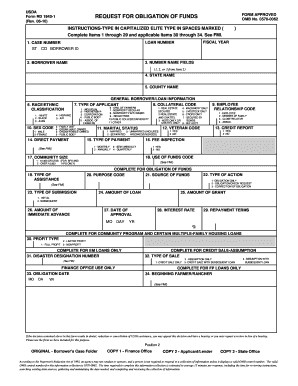
The For Rd 1940 1 Fmi form is essential for requesting the obligation of funds through the USDA. This guide will provide you with step-by-step instructions for completing the form online, ensuring a smooth application process.

Follow the steps to complete your application efficiently.

  1. Click the ‘Get Form’ button to access the form and open it in your preferred editor.
  2. Begin by filling out items 1 through 29. Start with the case number and loan number as requested in the designated fields.
  3. Enter the borrower name and co-borrower ID in their respective sections, ensuring the details are accurate.
  4. Provide the state and county names for relevant geographic identification.
  5. Complete the race/ethnic classification and type of applicant by selecting the appropriate codes.
  6. Indicate your marital status and whether you are a veteran by selecting the corresponding codes.
  7. Fill out the collateral code and the employee relationship code based on your specific situation.
  8. Choose the appropriate purpose code and source of funds to clarify the intent of your funding request.
  9. Review your entries and ensure you have provided accurate loan and grant amounts, including immediate advances if applicable.
  10. Finally, save changes to the form, then download, print, or share it as required.

Get started with your application to ensure you complete all necessary documents online.

Get form

Experience a faster way to fill out and sign forms on the web. Access the most extensive library of templates available.
Get form

Related content

request for obligation of funds - USDA Forms
USDA. Form RD 1940-1. REQUEST FOR OBLIGATION OF FUNDS. (Rev. 06-10). INSTRUCTIONS-TYPE IN...
Learn more
request for obligation of funds guaranteed loans...
PERCENT OF INTEREST. ASSISTANCE. Form RD 1940-3 ... Complete Items 1 through 25 and...
Learn more
Uniforms of the Royal Danish Army - Wikipedia
The Uniforms of the Royal Danish Army distinguish soldiers from other service members....
Learn more

Related links form

Admission Application - Louisiana State University At Alexandria LSU Alexandria Faculty Handbook - Louisiana State University At ... Liturgicon Contractor Registration Application - Town Of Providence Village

Questions & Answers

Get answers to your most pressing questions about US Legal Forms API.

Contact support

Use groups in Gmail At the top left, click Compose. In the "To" field, start typing the group name, then select the group from the list that appears. You'll see a list of contacts in the "To" field.

Change group settings Sign in to Google Groups. Click the name of a group. On the left, click Group settings. Enter information and choose settings for the group. Click Save changes.

0:06 1:43 Email groups in Gmail - YouTube YouTube Start of suggested clip End of suggested clip Then. You can go back to your contacts. And then just start clicking. On any one that you want toMoreThen. You can go back to your contacts. And then just start clicking. On any one that you want to add to your group. And then click groups over here on the right.

How do I manage email groups in Gmail? On the page that opens, you'll see a list of your existing groups. ... On the left-hand menu pane that opens, select “Group settings”. In the General section at the top, make the changes that you require. Select “Save changes” to update your group.

There are no passwords for group email addresses. The users in the group have access to it but there is no way to know who did what.

In order to change settings or manage the membership of a Google Group, you need to access the group on the web as follows: Either visit https://groups.google.com or click the apps chooser (grid icon) on the top of any Google page. Once on the Groups page, click the My Groups button.

0:07 1:51 How To Create A Group Email In Gmail - YouTube YouTube Start of suggested clip End of suggested clip Follow these easy steps after sign in to your google. Account go to the contacts. Select the namesMoreFollow these easy steps after sign in to your google. Account go to the contacts. Select the names of people from your contact list click on the create label on the left sidebar.

Join a group directly Sign in to Google Groups. Search for the group: At the top, click My groups and select All groups and messages. In the search box, enter the group's name or email address or a group topic and press Enter.

Get This Form Now!

Use professional pre-built templates to fill in and sign documents online faster. Get access to thousands of forms.
Get form
If you believe that this page should be taken down, please follow our DMCA take down processhere.
Get For Rd 1940 1 Fmi
Get form
  • Adoption
  • Bankruptcy
  • Contractors
  • Divorce
  • Home Sales
  • Employment
  • Identity Theft
  • Incorporation
  • Landlord Tenant
  • Living Trust
  • Name Change
  • Personal Planning
  • Small Business
  • Wills & Estates
  • Packages A-Z
  • Affidavits
  • Bankruptcy
  • Bill of Sale
  • Corporate - LLC
  • Divorce
  • Employment
  • Identity Theft
  • Internet Technology
  • Landlord Tenant
  • Living Wills
  • Name Change
  • Power of Attorney
  • Real Estate
  • Small Estates
  • Wills
  • All Forms
  • Forms A-Z
  • Other Templates
  • Legal Hub
  • About Us
  • Help Portal
  • Legal Resources
  • Blog
  • Affiliates
  • Contact Us
  • Delete My Account
  • Site Map
  • Industries
  • Forms in Spanish
  • Localized Forms
  • State-specific Forms
  • Forms Kit
  • Real Estate Handbook
  • All Guides
  • Notarize
  • Incorporation services
  • For Consumers
  • For Small Business
  • For Attorneys
  • USLegal
  • FormsPass
  • pdfFiller
  • signNow
  • altaFlow
  • DocHub
  • Instapage
Form Packages
  • Adoption
  • Bankruptcy
  • Contractors
  • Divorce
  • Home Sales
  • Employment
  • Identity Theft
  • Incorporation
  • Landlord Tenant
  • Living Trust
  • Name Change
  • Personal Planning
  • Small Business
  • Wills & Estates
  • Packages A-Z
Form Categories
  • Affidavits
  • Bankruptcy
  • Bill of Sale
  • Corporate - LLC
  • Divorce
  • Employment
  • Identity Theft
  • Internet Technology
  • Landlord Tenant
  • Living Wills
  • Name Change
  • Power of Attorney
  • Real Estate
  • Small Estates
  • Wills
  • All Forms
  • Forms A-Z
  • Other Templates
Customer Service
  • Legal Hub
  • About Us
  • Help Portal
  • Legal Resources
  • Blog
  • Affiliates
  • Contact Us
  • Delete My Account
  • Site Map
  • Industries
  • Forms in Spanish
  • Localized Forms
  • State-specific Forms
  • Forms Kit
Legal Guides
  • Real Estate Handbook
  • All Guides
Prepared for you
  • Notarize
  • Incorporation services
Our Customers
  • For Consumers
  • For Small Business
  • For Attorneys
Our Sites
  • USLegal
  • FormsPass
  • pdfFiller
  • signNow
  • altaFlow
  • DocHub
  • Instapage
Social Media
Call us now toll free:
+1 833 426 79 33
As seen in:
© Copyright 1999-2026 airSlate Legal Forms, Inc. 17 Station Street, Ste. 203, Brookline, MA 02445
  • Your Privacy Choices
  • Terms of Service
  • Privacy Notice
  • Content Takedown Policy
  • Bug Bounty Program