Loading
Get Fort Campbell Exemption Certificate
How it works
-

Open form follow the instructions
-

Easily sign the form with your finger
-

Send filled & signed form or save
How to fill out the Fort Campbell Exemption Certificate online
The Fort Campbell Exemption Certificate allows eligible employees to exempt their wages from Kentucky income tax, provided they are not residents of Kentucky. This guide offers clear, step-by-step instructions for completing the form online.
Follow the steps to complete the Fort Campbell Exemption Certificate.
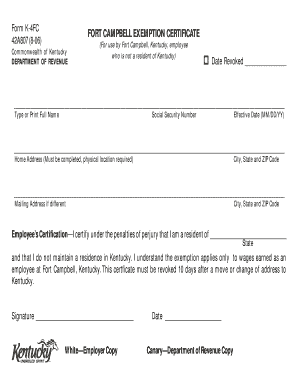
- Press the ‘Get Form’ button to access the Fort Campbell Exemption Certificate and open it in the document editor.
- In the first section, type or print your full name, ensuring that it is legible.
- Enter your Social Security Number in the designated field. This is crucial for identification purposes.
- Indicate the effective date of the exemption in the MM/DD/YY format.
- Provide your home address in the required field. This must include your physical location, as a P.O. box is not acceptable and will invalidate the certificate.
- If you have a mailing address that differs from your home address, fill it out in the specified area, including the city, state, and ZIP code.
- In the Employee’s Certification section, affirm that you are a resident of the stated state and do not maintain a residence in Kentucky. Make sure to review this statement carefully.
- Sign the form in the designated area to validate the certificate, and fill in the date of signing.
- Once all fields are accurately completed, you have the option to save your changes, download, print, or share the form as needed.
Complete your Fort Campbell Exemption Certificate online today to ensure your wages are exempt from Kentucky income tax.
How to use sales tax exemption certificates in California. ... This certificate includes the purchaser's Seller's Permit number, business details, and details about the goods which are to be purchased for resale.