Loading
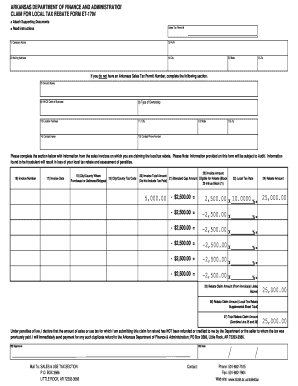
Get Claim For Local Tax Rebate Form Et-179a - Formupack
How it works
-

Open form follow the instructions
-

Easily sign the form with your finger
-

Send filled & signed form or save
How to fill out the CLAIM FOR LOCAL TAX REBATE FORM ET-179A - Formupack online
Filling out the Claim for Local Tax Rebate Form ET-179A online can streamline the process of reclaiming local taxes paid on eligible business purchases. This guide provides a step-by-step approach to help users accurately complete the form to facilitate their rebate claims.
Follow the steps to accurately fill out the form online.
- Click 'Get Form' button to access the Claim for Local Tax Rebate Form ET-179A and open it in the digital editor.
- Enter the company name in block 1, providing the full legal name of the business requesting the rebate.
- Input the Federal Employer Identification Number (FEIN) in block 2 to verify your business identification.
- In block 3, enter the mailing address for the business, ensuring it is accurate and up to date.
- Complete blocks 4 to 6 with your city, state, and zip code to finalize the company's location details.
- If you do not possess an Arkansas Sales Tax Permit, fill out blocks 7 to 15 with the owner's name, NAICS code, type of ownership, location address, and contact information.
- For block 16, record the invoice number associated with the local tax rebate claim.
- Input the invoice date in block 17, ensuring it reflects the date on the original invoice.
- Indicate the city and county where the purchase occurred or where the product was delivered in block 18.
- Fill in the City/County Tax Code in block 19 to clarify the relevant tax jurisdiction.
- Enter the total amount billed on the invoice in block 20, excluding taxes paid.
- In block 21, provide the standard cap amount eligible for rebate, typically set at $2,500.00 per invoice.
- Calculate the amount after applying the cap by subtracting block 21 from block 20 and enter this in block 22.
- Document the local tax rate applicable to the invoice in block 23.
- In block 24, calculate the rebate amount by multiplying the figure in block 22 by the local tax rate in block 23.
- Consolidate all rebate amounts from previous invoices and enter the total in block 25.
- If applicable, refer to the supplemental sheet to report any additional rebate claims in block 26.
- Add the amounts from blocks 25 and 26 to get the total rebate claim amount and enter this in block 27.
- Sign and date the form in blocks 28 and 29 to validate the claim.
- Prepare to submit your form by ensuring all photocopies of invoices are attached as required.
- Complete your filing by reviewing all entries and confidently save changes, download, print, or share the form as necessary.
Start filling out the Claim for Local Tax Rebate Form ET-179A online to claim your eligible rebate today!
Arkansas Requirements To obtain exemption from Arkansas income tax: o Submit a copy of: ▪ 1) the IRS Determination Letter, ▪ 2) pages 1 and 2 of the IRS Form 1023, and ▪ 3) a statement declaring Arkansas Code Exemption: • The statement must declare that the organization is exempt under ARK. CODE ANN. § 26-51-303.
Industry-leading security and compliance
US Legal Forms protects your data by complying with industry-specific security standards.
-
In businnes since 199725+ years providing professional legal documents.
-
Accredited businessGuarantees that a business meets BBB accreditation standards in the US and Canada.
-
Secured by BraintreeValidated Level 1 PCI DSS compliant payment gateway that accepts most major credit and debit card brands from across the globe.