Loading
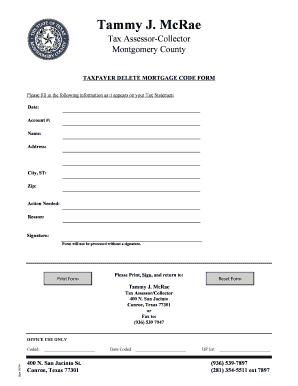
Get Taxpayer Delete Mortgage Code Form - Montgomery County - Mctx
How it works
-

Open form follow the instructions
-

Easily sign the form with your finger
-

Send filled & signed form or save
How to fill out the TAXPAYER DELETE MORTGAGE CODE FORM - Montgomery County - Mctx online
Filling out the Taxpayer Delete Mortgage Code Form is an important step for managing your mortgage records with Montgomery County. This guide provides clear, step-by-step instructions to assist users in completing the form online accurately and efficiently.
Follow the steps to successfully complete the form.
- Press the ‘Get Form’ button to acquire the form and open it in your preferred editor.
- Fill in the date in the specified field, ensuring it reflects the current date of your submission.
- Enter your account number as it appears on your tax statement to ensure proper identification.
- Provide your full name in the 'Name' section, formatted as first name followed by last name.
- Input your complete address, including street number and name, and leave the relevant section blank.
- Complete the city, state (using its two-letter abbreviation), and zip code fields accurately.
- Indicate the action needed by selecting the appropriate option from the list provided.
- Explain the reason for the form submission in detail to provide context for your request.
- Add your signature in the designated area, as the form will not be processed without it.
- Once all fields are filled, save any changes, and choose to download, print, or share the completed form as necessary.
Start completing your documents online today to ensure timely processing.
Related links form
Paying by electronic check will not incur any service fees and you can conveniently schedule these payments to be paid on the date you select. You can also pay by credit/debit card (Visa, MasterCard, American Express, and Discover with a 2.3% service fee).