Loading
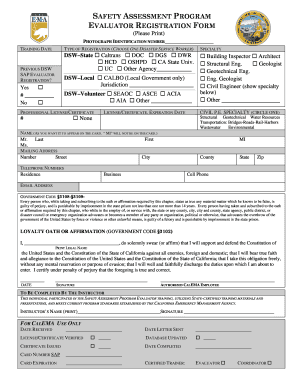
Get Gibshie Form
How it works
-

Open form follow the instructions
-

Easily sign the form with your finger
-

Send filled & signed form or save
How to fill out the Gibshie Form online
Filling out the Gibshie Form online can seem daunting, but this step-by-step guide is designed to help you navigate each section with ease. By following these clear instructions, you will be able to complete the form accurately and efficiently.
Follow the steps to successfully fill out the Gibshie Form online.
- Click the ‘Get Form’ button to access the Gibshie Form and open it for editing.
- Begin with the photograph identification section. Ensure the digital photo meets the requirements: use a light background, and ensure clarity and focus. Rename the photo with your last name and first name before uploading.
- Enter the training date in the designated field. This is essential for processing your registration.
- Select the type of registration by choosing one option among DSW-State, DSW-Local, or DSW-Volunteer. Ensure to check the appropriate box to indicate your employment status.
- If you have had a previous DSW registration, answer the question regarding your status and provide your registration number.
- In the specialty section, select all relevant specialties that apply to your qualifications. Note that if you choose multiple specialties, the highest-level license noted will be featured on your DSW card.
- List your professional license or certificate numbers in the provided field. If you do not hold any certifications, mark the 'None' option.
- Provide the expiration dates for any licenses or certifications listed. This is important for verification purposes.
- For civil P.E. specialty, circle the applicable specialty from the given options.
- Enter your name as you wish it to appear on the registration card. Use proper formatting and legibility.
- Fill in your mailing address to ensure you receive important information regarding your registration.
- Provide your primary and alternate telephone numbers to maintain communication for deployment purposes.
- Enter your email address for updates related to the program, ensuring you monitor this for important notifications.
- Carefully read the loyalty oath or affirmation, print your full legal name, and provide your signature to complete this section.
- Have the instructor who taught your training course print their name and sign the form to certify your participation.
- Once all fields are completed, save your changes and review the form for any errors before finalizing your submission. You may choose to download, print, or share the completed form as needed.
Complete your Gibshie Form online today to facilitate a smooth registration process and ensure your participation in the Safety Assessment Program.
Under New Jersey law, only one creditor may garnish your wages at a time.
Industry-leading security and compliance
US Legal Forms protects your data by complying with industry-specific security standards.
-
In businnes since 199725+ years providing professional legal documents.
-
Accredited businessGuarantees that a business meets BBB accreditation standards in the US and Canada.
-
Secured by BraintreeValidated Level 1 PCI DSS compliant payment gateway that accepts most major credit and debit card brands from across the globe.