We use cookies to improve security, personalize the user experience, enhance our marketing activities (including cooperating with our marketing partners) and for other business use.
Click "here" to read our Cookie Policy. By clicking "Accept" you agree to the use of cookies. Read less
Read more
Accept
Loading
Form preview
  • US Legal Forms
  • Form Library
  • More Forms
  • More Uncategorized Forms
  • Application For Non-residential Alarm Permit City Of Copperas Cove

Get Application For Non-residential Alarm Permit City Of Copperas Cove

Today's and tonight's Copperas Cove, TX (76522) weather forecast, weatherconditions and Doppler radar from The Weather Channel and Weather.com.

How it works

  1. Open form

    Open form follow the instructions

  2. Easily sign form

    Easily sign the form with your finger

  3. Share form

    Send filled & signed form or save

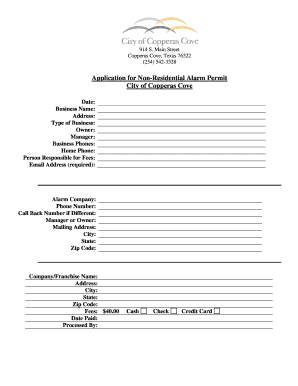
How to fill out the Application For Non-Residential Alarm Permit City Of Copperas Cove online

Filling out the Application For Non-Residential Alarm Permit for the City of Copperas Cove can be an important step in ensuring your business's security. This guide provides clear instructions on how to effectively complete the application online, making the process straightforward and efficient.

Follow the steps to accurately complete your application online.

  1. Click ‘Get Form’ button to download the application form and open it in your PDF editor.
  2. Begin by entering the date at the top of the form to indicate when you are submitting the application.
  3. Next, fill in the business name. This should be the official name of the business you are applying for the alarm permit.
  4. Provide the complete address of the business location. This includes street address, city, state, and zip code.
  5. Indicate the type of business by specifying whether it is retail, office, warehouse, etc.
  6. Enter the name of the owner of the business, followed by the name of the manager if applicable.
  7. List the business phone numbers where you can be reached during business hours, followed by your home phone number for additional contact.
  8. Identify the person responsible for the alarm fees, ensuring their contact information is correct.
  9. Your email address is required. Make sure this is a valid email for notifications.
  10. Fill in the alarm company's details, including their phone number and an alternative callback number if it is different.
  11. Provide the manager or owner’s name from the alarm company, along with their mailing address.
  12. Complete the company/franchise name and address including city, state, and zip code if applicable.
  13. Review the fee section which indicates a cost of $40.00. Make sure to note the date you made the payment.
  14. Finally, select your payment method, which can be cash, check, or credit card and note who processed the application.
  15. Once you have filled in all necessary fields, save your changes, and download or print the completed form for your records.

Complete your application online today to ensure your business is protected with an alarm permit.

Get form

Experience a faster way to fill out and sign forms on the web. Access the most extensive library of templates available.
Get form

Related content

Application for Residential Alarm Permit - City of...
914 S. Main Street. Copperas Cove, Texas 76522. (254) 542-3528. Application for...
Learn more
General Information - Central Texas College - For...
To contact the campus police non-emergency line, dial extension 1427 from ... Department...
Learn more
University of Texas at Austin - Wikipedia
The University of Texas at Austin, often referred to as UT Austin, UT, or Texas, is a...
Learn more

Related links form

Bcs/cd-541 - LARA - Dleg State Mi BCS/CD-518 - Licensing And Regulatory Affairs - Dleg State Mi Fileableform Application For Reservation Of Name - LARA - Dleg State Mi

Questions & Answers

Get answers to your most pressing questions about US Legal Forms API.

Contact support

If you need assistance with cancelling your alarm permit, please call the Burglar Alarm Administration at 713-581-7410.

Excessive False Alarms If the alarm site does not have an alarm permit (through non-registration or through having been revoked), the alarm system user will be subject to a fine of between $300 and $500, for each separate occurrence.

Chapter 233, if you have an active alarm system in the Montgomery County, TX , it must be registered with the Montgomery County separately. The fee for permit registration/renewal and false alarms is set forth below and shall be paid by the alarm user."

A security alarm permit is required if you have a security alarm that is audible and/or monitored to provide police response. The annual permit fee is $50 for a residence and $100 for a business permit. ​A permitted alarm site is allowed three free false burglar alarms in a twelve-month period.

OPERATING AN ALARM SYSTEM WITHOUT A PERMIT: ANY PERSON OR ENTITY OPERATING AN ALARM SYSTEM WITHOUT A PERMIT IS SUBJECT TO A FEE OF $75.00 FOR EACH FALSE ALARM.

To register an alarm system: the Alarm User must submit a fully completed, signed application along with payment in a method acceptable to the Alarm Detail. The fee for a new permit, for both residential and business alarms, is $20.00. The renewal fee for an alarm permit is $20.00.

To prevent valuable resources being tied up in responding to these calls, any person or business operating an alarm system with the intent to summon an emergency service is required to register an alarm system. An alarm permit must be obtained within 30 days of an alarm system installation.

Get This Form Now!

Use professional pre-built templates to fill in and sign documents online faster. Get access to thousands of forms.
Get form
If you believe that this page should be taken down, please follow our DMCA take down processhere.

Industry-leading security and compliance

US Legal Forms protects your data by complying with industry-specific security standards.
  • In businnes since 1997
    25+ years providing professional legal documents.
  • Accredited business
    Guarantees that a business meets BBB accreditation standards in the US and Canada.
  • Secured by Braintree
    Validated Level 1 PCI DSS compliant payment gateway that accepts most major credit and debit card brands from across the globe.
Get Application For Non-Residential Alarm Permit City Of Copperas Cove
Get form
Form Packages
Adoption
Bankruptcy
Contractors
Divorce
Home Sales
Employment
Identity Theft
Incorporation
Landlord Tenant
Living Trust
Name Change
Personal Planning
Small Business
Wills & Estates
Packages A-Z
Form Categories
Affidavits
Bankruptcy
Bill of Sale
Corporate - LLC
Divorce
Employment
Identity Theft
Internet Technology
Landlord Tenant
Living Wills
Name Change
Power of Attorney
Real Estate
Small Estates
Wills
All Forms
Forms A-Z
Form Library
Customer Service
Terms of Service
Privacy Notice
Legal Hub
Content Takedown Policy
Bug Bounty Program
About Us
Help Portal
Legal Resources
Blog
Affiliates
Contact Us
Delete My Account
Site Map
Industries
Forms in Spanish
Localized Forms
State-specific Forms
Forms Kit
Legal Guides
Real Estate Handbook
All Guides
Prepared for You
Notarize
Incorporation services
Our Customers
For Consumers
For Small Business
For Attorneys
Our Sites
US Legal Forms
USLegal
FormsPass
pdfFiller
signNow
airSlate WorkFlow
DocHub
Instapage
Social Media
Call us now toll free:
+1 833 426 79 33
As seen in:
  • USA Today logo picture
  • CBC News logo picture
  • LA Times logo picture
  • The Washington Post logo picture
  • AP logo picture
  • Forbes logo picture
© Copyright 1997-2025
airSlate Legal Forms, Inc.
3720 Flowood Dr, Flowood, Mississippi 39232
Form Packages
Adoption
Bankruptcy
Contractors
Divorce
Home Sales
Employment
Identity Theft
Incorporation
Landlord Tenant
Living Trust
Name Change
Personal Planning
Small Business
Wills & Estates
Packages A-Z
Form Categories
Affidavits
Bankruptcy
Bill of Sale
Corporate - LLC
Divorce
Employment
Identity Theft
Internet Technology
Landlord Tenant
Living Wills
Name Change
Power of Attorney
Real Estate
Small Estates
Wills
All Forms
Forms A-Z
Form Library
Customer Service
Terms of Service
Privacy Notice
Legal Hub
Content Takedown Policy
Bug Bounty Program
About Us
Help Portal
Legal Resources
Blog
Affiliates
Contact Us
Delete My Account
Site Map
Industries
Forms in Spanish
Localized Forms
State-specific Forms
Forms Kit
Legal Guides
Real Estate Handbook
All Guides
Prepared for You
Notarize
Incorporation services
Our Customers
For Consumers
For Small Business
For Attorneys
Our Sites
US Legal Forms
USLegal
FormsPass
pdfFiller
signNow
airSlate WorkFlow
DocHub
Instapage
Social Media
Call us now toll free:
+1 833 426 79 33
As seen in:
  • USA Today logo picture
  • CBC News logo picture
  • LA Times logo picture
  • The Washington Post logo picture
  • AP logo picture
  • Forbes logo picture
© Copyright 1997-2025
airSlate Legal Forms, Inc.
3720 Flowood Dr, Flowood, Mississippi 39232