We use cookies to improve security, personalize the user experience, enhance our marketing activities (including cooperating with our marketing partners) and for other business use.
Click "here" to read our Cookie Policy. By clicking "Accept" you agree to the use of cookies. Read less
Read more
Accept
Loading
Form preview
  • US Legal Forms
  • Form Library
  • More Forms
  • More Uncategorized Forms
  • Instructions For Use Of Rus Form 481 - Association Of Communication ... - Ace-engineers

Get Instructions For Use Of Rus Form 481 - Association Of Communication ... - Ace-engineers

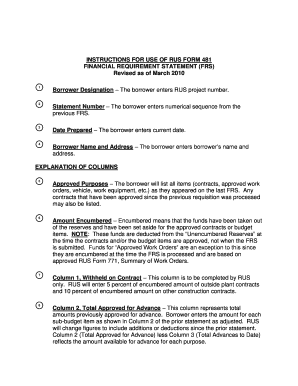
INSTRUCTIONS FOR USE OF RUS FORM 481 FINANCIAL REQUIREMENT STATEMENT (FRS) Revised as of March 2010 1 Borrower Designation ? The borrower enters RUS project number. 2 Statement Number ? The borrower.

How it works

  1. Open form

    Open form follow the instructions

  2. Easily sign form

    Easily sign the form with your finger

  3. Share form

    Send filled & signed form or save

How to use or fill out the Instructions For Use Of Rus Form 481 - Association Of Communication ... - Ace-engineers online

Filling out the Instructions For Use Of Rus Form 481 can seem daunting, but with clear guidance, you can complete it efficiently. This guide will walk you through each section of the form to ensure you provide all necessary information accurately.

Follow the steps to fill out the Instructions For Use of Rus Form 481 correctly.

  1. Click ‘Get Form’ button to retrieve the form and open it in your designated editor.
  2. In the 'Borrower Designation' field, enter your RUS project number accurately.
  3. For 'Statement Number', input the numerical sequence from your previous Financial Requirement Statement (FRS).
  4. In the 'Date Prepared' section, write today's date in the required format.
  5. Provide your 'Borrower Name and Address' plainly and concisely.
  6. In the 'Approved Purposes' column, list all relevant items such as contracts and approved work orders just as recorded in the last submission.
  7. Enter funds under 'Amount Encumbered', which should reflect money set aside for contracts approved since the last FRS.
  8. Complete Column 1 'Withheld on Contract' by letting RUS fill in the percent withheld as per guidelines.
  9. Fill out Column 2 'Total Approved for Advance' by entering the amounts previously approved, adjusting as necessary.
  10. Input the total amount advanced to date in Column 3 'Total Advances to Date', based on the prior statement.
  11. In Column 4 'Advances Now Requested', state the amounts you are requesting for each applicable item.
  12. Column 5 'Advances Currently Approved' will be filled by RUS with the approved amounts at processing.
  13. Provide disbursement amounts in Column 6 'Total Disbursement and Credits' as of the last day of the preceding month.
  14. In the 'Certification' section, ensure you sign all copies of the FRS with an original signature, as authorized.
  15. Finally, review all field entries for accuracy, save your changes, and get ready to submit the form as per the submission notes.

Complete your documents online today to ensure timely processing and compliance.

Get form

Experience a faster way to fill out and sign forms on the web. Access the most extensive library of templates available.
Get form

Related content

TABLE OF CONTENTS - USDA Rural Development
C. Using UniFi to Calculate the Maximum Loan Amount ... ATTACHMENT 3-B: FOLLOW-UP...
Learn more
Effective Project Management for Building Design...
responsibilities for programming in areas of Architecture, Land Use Planning, Urban...
Learn more
XI-N450 802.11abgn 3x3 Module Test Setup Photos...
to use DHCP to assign IP addresses to the Array's Ethernet interfaces, ... this Array via...
Learn more

Related links form

The Frenzel Technique, Step-by-Step CREI 19- CAST-3 MBA SUPPLEMENTARY STATEMENT OF CONTINUING DISABILITY - Nalc Management Instruction EL-430-2012-2 - Back Pay - Nalc

Questions & Answers

Get answers to your most pressing questions about US Legal Forms API.

Contact support

Form 481 also includes a supply chain certification, which requires carriers to certify that no universal service support is being used to purchase, rent, lease, obtain or maintain any equipment or services produced or provided by any company designated by the FCC as posing a national security threat to the integrity ...

The FCC Form 555, or “Annual Lifeline Eligible Telecommunications Carrier Certification Form,” reports the results of the annual recertification process and includes data accuracy certifications.

Get This Form Now!

Use professional pre-built templates to fill in and sign documents online faster. Get access to thousands of forms.
Get form
If you believe that this page should be taken down, please follow our DMCA take down processhere.

Industry-leading security and compliance

US Legal Forms protects your data by complying with industry-specific security standards.
  • In businnes since 1997
    25+ years providing professional legal documents.
  • Accredited business
    Guarantees that a business meets BBB accreditation standards in the US and Canada.
  • Secured by Braintree
    Validated Level 1 PCI DSS compliant payment gateway that accepts most major credit and debit card brands from across the globe.
Get Instructions For Use Of Rus Form 481 - Association Of Communication ... - Ace-engineers
Get form
Form Packages
Adoption
Bankruptcy
Contractors
Divorce
Home Sales
Employment
Identity Theft
Incorporation
Landlord Tenant
Living Trust
Name Change
Personal Planning
Small Business
Wills & Estates
Packages A-Z
Form Categories
Affidavits
Bankruptcy
Bill of Sale
Corporate - LLC
Divorce
Employment
Identity Theft
Internet Technology
Landlord Tenant
Living Wills
Name Change
Power of Attorney
Real Estate
Small Estates
Wills
All Forms
Forms A-Z
Form Library
Customer Service
Terms of Service
Privacy Notice
Legal Hub
Content Takedown Policy
Bug Bounty Program
About Us
Help Portal
Legal Resources
Blog
Affiliates
Contact Us
Delete My Account
Site Map
Industries
Forms in Spanish
Localized Forms
State-specific Forms
Forms Kit
Legal Guides
Real Estate Handbook
All Guides
Prepared for You
Notarize
Incorporation services
Our Customers
For Consumers
For Small Business
For Attorneys
Our Sites
US Legal Forms
USLegal
FormsPass
pdfFiller
signNow
airSlate WorkFlow
DocHub
Instapage
Social Media
Call us now toll free:
+1 833 426 79 33
As seen in:
  • USA Today logo picture
  • CBC News logo picture
  • LA Times logo picture
  • The Washington Post logo picture
  • AP logo picture
  • Forbes logo picture
© Copyright 1997-2025
airSlate Legal Forms, Inc.
3720 Flowood Dr, Flowood, Mississippi 39232
Form Packages
Adoption
Bankruptcy
Contractors
Divorce
Home Sales
Employment
Identity Theft
Incorporation
Landlord Tenant
Living Trust
Name Change
Personal Planning
Small Business
Wills & Estates
Packages A-Z
Form Categories
Affidavits
Bankruptcy
Bill of Sale
Corporate - LLC
Divorce
Employment
Identity Theft
Internet Technology
Landlord Tenant
Living Wills
Name Change
Power of Attorney
Real Estate
Small Estates
Wills
All Forms
Forms A-Z
Form Library
Customer Service
Terms of Service
Privacy Notice
Legal Hub
Content Takedown Policy
Bug Bounty Program
About Us
Help Portal
Legal Resources
Blog
Affiliates
Contact Us
Delete My Account
Site Map
Industries
Forms in Spanish
Localized Forms
State-specific Forms
Forms Kit
Legal Guides
Real Estate Handbook
All Guides
Prepared for You
Notarize
Incorporation services
Our Customers
For Consumers
For Small Business
For Attorneys
Our Sites
US Legal Forms
USLegal
FormsPass
pdfFiller
signNow
airSlate WorkFlow
DocHub
Instapage
Social Media
Call us now toll free:
+1 833 426 79 33
As seen in:
  • USA Today logo picture
  • CBC News logo picture
  • LA Times logo picture
  • The Washington Post logo picture
  • AP logo picture
  • Forbes logo picture
© Copyright 1997-2025
airSlate Legal Forms, Inc.
3720 Flowood Dr, Flowood, Mississippi 39232