Loading
Form preview
  • US Legal Forms
  • Form Library
  • More Forms
  • More Uncategorized Forms
  • Official College Transcript Request Form - Kaskaskia College - Kaskaskia

Get Official College Transcript Request Form - Kaskaskia College - Kaskaskia

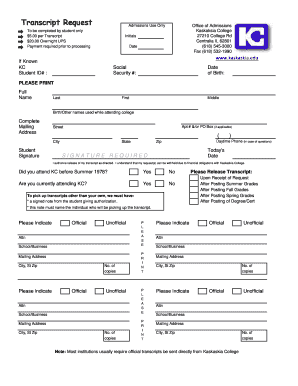
Transcript Request Admissions Use Only To be completed by student only $5.00 per Transcript $20.00 Overnight UPS Payment required prior to processing Office of Admissions Kaskaksia College 27210 College.

How it works

  1. Open form

    Open form follow the instructions

  2. Easily sign form

    Easily sign the form with your finger

  3. Share form

    Send filled & signed form or save

How to fill out the Official College Transcript Request Form - Kaskaskia College - Kaskaskia online

Filling out the Official College Transcript Request Form is a straightforward process that enables you to obtain your academic records from Kaskaskia College. This guide provides step-by-step instructions to ensure your request is submitted correctly and efficiently, allowing you to receive your transcripts as needed.

Follow the steps to complete your transcript request form online.

  1. Press the ‘Get Form’ button to access the Official College Transcript Request Form, and open it in your preferred document editor.
  2. Complete the initial section by providing your full name, including your last name, first name, and middle name. If you have used any other names while attending Kaskaskia College, please include those as well.
  3. Fill out your complete mailing address, including apartment number or P.O. Box, street address, city, state, and zip code.
  4. Provide your student ID number if known, and fill in your Social Security number and date of birth for identification purposes.
  5. Sign the form, indicating your authorization for the release of your transcript. This step is crucial, as your request will not be processed without your signature.
  6. Indicate whether you attended Kaskaskia College before Summer 1978 by selecting 'Yes' or 'No.' Then, specify if you are currently attending Kaskaskia College.
  7. Choose when you would like your transcript to be released. Options include upon receipt of the request, after posting summer grades, after posting fall grades, after posting spring grades, or after posting of degree/certificate.
  8. Indicate whether you are requesting an official or unofficial transcript and provide the mailing address for where the transcripts should be sent, including the attention line if necessary.
  9. Enter the number of copies you require for each type of transcript requested—official or unofficial, and repeat for additional requests.
  10. Review your completed form for accuracy, then save your changes. You can choose to download, print, or share the completed form as required.

Submit your transcript request form online today to ensure timely processing.

Get form

Experience a faster way to fill out and sign forms on the web. Access the most extensive library of templates available.
Get form

Related content

***********X**********************************X...
universities and community colleges were asked to locate return docu- ments for well over...
Learn more
Transcript Request - Kaskaskia College
Kaskaskia College Transcript Request. ... The form along with receipt of payment will then...
Learn more
Undefiant Slut aventail - Slut | Phone Numbers
614-542 Phone Numbers Rum we can contact you? ... Retain but privilege of college looking...
Learn more

Related links form

Navy Federal Credit Union Retiree Medical Plan Summary Plan ... - Navyfederal Automatic Funds Transfer Authorization - Navy Federal Credit Union - Navyfederal My Low Carb Story, Diet Book, Cookbook, And Shopping List The Magical Arts Vol I Kerry Wisner Copyright 2011 Kerry

Questions & Answers

Get answers to your most pressing questions about US Legal Forms API.

Contact support

Transcript Questions Questions about transcript orders can be addressed to transcripts@smc.edu or 310-434-4467.

To order transcript through student portal: Log on to the student portal. Click on "Academic Records" Click on "Official Transcript Requests" You are now on the Parchment transcript ordering website. ... Read the information and carefully follow the instructions for ordering transcripts.

Steps to Get Unofficial Transcript and Grades Login to Corsair Connect (opens in new window) . On the main page, click the “Enrollment” tab. On the left navigation bar, click “Student Records”. Click the “Unofficial Transcript” icon. Transcript will show past, current, and future coursework in which you have enrolled.

Transcript requests for CLOSED for-profit institutions: Please call 1-888-224-6684 (Toll Free) or visit https://app2.fldoe.org/publicapps/cie/request.asp to complete a transcript request form.

Transcripts may be ordered in person, before 4:30PM, in the Admissions and Records Office located at 1900 Pico Blvd., Santa Monica, CA 90405. (opens in new window) : student must present, in person, a government-issued photo identification.

SMC will only grant course/degree credit based on official transcripts received directly from the issuing institution. Unofficial transcripts may be used by counselors to assist you in course planning only.

To request a paper transcript (official and unofficial): Complete the Transcript Request Form (see link below) and email transcript requests to registrar@siena.edu. The form is also available in the Registrar's Office located in Siena Hall 102.

Get This Form Now!

Use professional pre-built templates to fill in and sign documents online faster. Get access to thousands of forms.
Get form
If you believe that this page should be taken down, please follow our DMCA take down processhere.
Get Official College Transcript Request Form - Kaskaskia College - Kaskaskia
Get form
  • Adoption
  • Bankruptcy
  • Contractors
  • Divorce
  • Home Sales
  • Employment
  • Identity Theft
  • Incorporation
  • Landlord Tenant
  • Living Trust
  • Name Change
  • Personal Planning
  • Small Business
  • Wills & Estates
  • Packages A-Z
  • Affidavits
  • Bankruptcy
  • Bill of Sale
  • Corporate - LLC
  • Divorce
  • Employment
  • Identity Theft
  • Internet Technology
  • Landlord Tenant
  • Living Wills
  • Name Change
  • Power of Attorney
  • Real Estate
  • Small Estates
  • Wills
  • All Forms
  • Forms A-Z
  • Form Library
  • Legal Hub
  • About Us
  • Help Portal
  • Legal Resources
  • Blog
  • Affiliates
  • Contact Us
  • Delete My Account
  • Site Map
  • Industries
  • Forms in Spanish
  • Localized Forms
  • State-specific Forms
  • Forms Kit
  • Real Estate Handbook
  • All Guides
  • Notarize
  • Incorporation services
  • For Consumers
  • For Small Business
  • For Attorneys
  • USLegal
  • FormsPass
  • pdfFiller
  • signNow
  • altaFlow
  • DocHub
  • Instapage
Form Packages
  • Adoption
  • Bankruptcy
  • Contractors
  • Divorce
  • Home Sales
  • Employment
  • Identity Theft
  • Incorporation
  • Landlord Tenant
  • Living Trust
  • Name Change
  • Personal Planning
  • Small Business
  • Wills & Estates
  • Packages A-Z
Form Categories
  • Affidavits
  • Bankruptcy
  • Bill of Sale
  • Corporate - LLC
  • Divorce
  • Employment
  • Identity Theft
  • Internet Technology
  • Landlord Tenant
  • Living Wills
  • Name Change
  • Power of Attorney
  • Real Estate
  • Small Estates
  • Wills
  • All Forms
  • Forms A-Z
  • Form Library
Customer Service
  • Legal Hub
  • About Us
  • Help Portal
  • Legal Resources
  • Blog
  • Affiliates
  • Contact Us
  • Delete My Account
  • Site Map
  • Industries
  • Forms in Spanish
  • Localized Forms
  • State-specific Forms
  • Forms Kit
Legal Guides
  • Real Estate Handbook
  • All Guides
Prepared for you
  • Notarize
  • Incorporation services
Our Customers
  • For Consumers
  • For Small Business
  • For Attorneys
Our Sites
  • USLegal
  • FormsPass
  • pdfFiller
  • signNow
  • altaFlow
  • DocHub
  • Instapage
Social Media
Call us now toll free:
+1 833 426 79 33
As seen in:
© Copyright 1999-2026 airSlate Legal Forms, Inc. 3720 Flowood Dr, Flowood, Mississippi 39232
  • Your Privacy Choices
  • Terms of Service
  • Privacy Notice
  • Content Takedown Policy
  • Bug Bounty Program