Loading
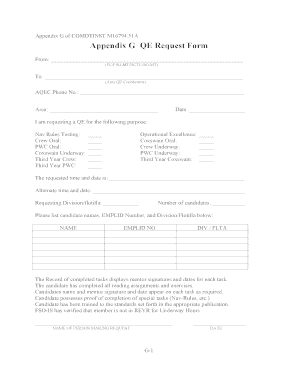
Get Appendix G Qe Request Form
How it works
-

Open form follow the instructions
-

Easily sign the form with your finger
-

Send filled & signed form or save
How to fill out the Appendix G QE Request Form online
Completing the Appendix G QE Request Form online is a straightforward process designed to assist users in efficiently submitting their requests. This guide provides step-by-step instructions to help users navigate and fill out the necessary fields with clarity and confidence.
Follow the steps to complete the Appendix G QE Request Form online.
- Press the ‘Get Form’ button to access the Appendix G QE Request Form and open it in your online editor.
- Fill in the 'From' section with your name and designation, specifying if you are an FC, FSO-MT, BCTC, or SO-MT.
- Complete the 'To' section by entering the name of the Area QE Coordinator.
- Input your contact phone number in the 'AQEC Phone No.' field.
- Indicate the relevant area in the designated space.
- Enter the current date in the appropriate field.
- Select the purpose of your QE request by checking the relevant boxes under 'Nav Rules Testing' or 'Operational Excellence'.
- Specify the requested time and date for the QE in the corresponding field.
- Provide an alternate time and date if applicable.
- Indicate your requesting division or flotilla.
- State the number of candidates by filling in the designated field.
- Below the number of candidates, list each candidate's names, EMPLID number, and their respective division/flotilla in the provided table.
- Make sure the record of completed tasks is filled in, detailing mentor signatures and dates for each task as required.
- Confirm that each candidate has completed all necessary reading assignments and exercises.
- Ensure candidates' names, mentor signatures, and dates are documented for each completed task.
- Verify that the candidate possesses proof of completion for special tasks, like Nav Rules.
- Confirm that each candidate has been trained according to the required publication standards.
- Check that the FSO-IS has verified the member is not in REYR for Underway Hours.
- Finally, fill in your name and the date at the end of the form as the person making the request.
- Once all sections are complete, save your changes, and then download, print, or share the form as needed.
Complete your Appendix G QE Request Form online today for a smoother submission process.
A variety of factors can influence these exchange rates, including the amounts of imports and exports, GDP, market expectations, and inflation. For example, if the GDP falls in one nation, that nation is likely to import less. If GDP grows, it will import more.
Industry-leading security and compliance
US Legal Forms protects your data by complying with industry-specific security standards.
-
In businnes since 199725+ years providing professional legal documents.
-
Accredited businessGuarantees that a business meets BBB accreditation standards in the US and Canada.
-
Secured by BraintreeValidated Level 1 PCI DSS compliant payment gateway that accepts most major credit and debit card brands from across the globe.