Loading
Get Cable Complaint Report
How it works
-

Open form follow the instructions
-

Easily sign the form with your finger
-

Send filled & signed form or save
How to fill out the CABLE COMPLAINT REPORT online
Filing a cable complaint can be a straightforward process when you have the right guidance. This guide provides a step-by-step approach to filling out the CABLE COMPLAINT REPORT online, ensuring you have all necessary information at hand.
Follow the steps to complete your online CABLE COMPLAINT REPORT
- Press the ‘Get Form’ button to download the form and view it in your document editor.
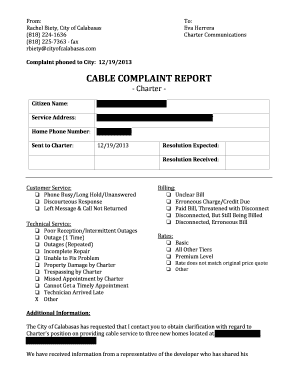
- Begin by entering your name in the ‘Citizen Name’ field. This should reflect your full name as it appears on official documents.
- Provide the service address in the designated ‘Service Address’ field. Make sure to include the full address to ensure proper identification.
- Enter your home phone number clearly in the ‘Home Phone Number’ section. This number will be used for follow-up communication regarding your complaint.
- In the section labeled ‘Customer Service,’ select the appropriate issue from the given options. If your concern does not match any listed, check ‘Other’ and specify your complaint.
- Proceed to the ‘Technical Service’ section. Choose any applicable problems related to cable reception or service interruptions. Again, if none apply, check ‘Other’ and provide details.
- For the ‘Billing’ section, indicate any billing-related issues that you have encountered. Select one or more options that fit, and clarify if you need to check ‘Other’.
- In the ‘Rates’ section, note any discrepancies you've observed in the rates charged compared to what was originally quoted.
- Use the ‘Additional Information’ field to provide any extra context or details about your complaint, particularly if it involves multiple interactions with Charter Communications.
- Review your responses for accuracy, then save your changes. You may choose to download, print, or share the completed form as needed.
Ready to take action? Complete your CABLE COMPLAINT REPORT online today!
Visit Customer Care. Call Customer Care on 1 (800) 934-6489. Email Customer Care on We_can_help@cable.comcast.com. Tweet Comcast Customer Care. Tweet Comcast. Watch Comcast.
Industry-leading security and compliance
US Legal Forms protects your data by complying with industry-specific security standards.
-
In businnes since 199725+ years providing professional legal documents.
-
Accredited businessGuarantees that a business meets BBB accreditation standards in the US and Canada.
-
Secured by BraintreeValidated Level 1 PCI DSS compliant payment gateway that accepts most major credit and debit card brands from across the globe.