Loading
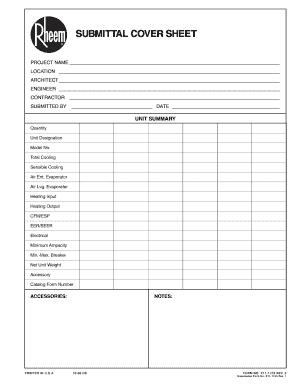
Get Submittal Cover Sheet
How it works
-

Open form follow the instructions
-

Easily sign the form with your finger
-

Send filled & signed form or save
How to fill out the Submittal Cover Sheet online
Filling out the Submittal Cover Sheet online is a critical task that ensures all project details are submitted correctly and comprehensively. This guide provides you with step-by-step instructions to help you navigate each section of the form with ease.
Follow the steps to complete your Submittal Cover Sheet online.
- Click the ‘Get Form’ button to obtain the form and open it in the editing interface.
- Begin by entering the project name in the designated field at the top of the form. Ensure that it is accurate and represents the project clearly.
- Next, input the project location. This should include the full address details to avoid any confusion during the submission process.
- Fill in the architect's name. This information is crucial for routing the submission to the correct person.
- Enter the engineer's name in the specified field, ensuring it is the correct contact for the project.
- Complete the contractor section by providing the name of the contractor responsible for the project.
- In the submitted by section, write your name along with the date of submission. This section is important for tracking accountability.
- For the unit summary section, fill out details like quantity, unit designation, model number, and various performance metrics such as total cooling and heating outputs.
- Remember to include any additional notes or accessory information that might be relevant to the submission.
- Once all sections are complete, you can choose to save your changes, download the form, print it, or share it according to your needs.
Complete your documents online today for a smoother submission process.
A cover sheet typically includes the title of the document, the name of the project, author details, date, and any relevant identification numbers. It may also contain a brief summary of the contents and instructions for the recipient. By using a Submittal Cover Sheet, you ensure that all essential information is clearly presented, helping to facilitate effective communication between all parties involved.