Loading
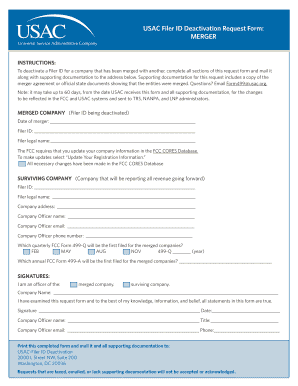
Get Usac Filer Id Deactivation Request Form: Merger - Usac
How it works
-

Open form follow the instructions
-

Easily sign the form with your finger
-

Send filled & signed form or save
How to fill out the USAC Filer ID Deactivation Request Form: MERGER - Usac online
Completing the USAC Filer ID Deactivation Request Form is an important step for companies that have merged and need to deactivate their previous Filer ID. This guide will help you navigate the process clearly and effectively.
Follow the steps to complete the form correctly.
- Press the ‘Get Form’ button to access the form and open it for editing.
- In the 'Merged Company' section, provide the date of the merger, the Filer ID being deactivated, and the legal name of the entity. Ensure the information is accurate and corresponds to official documentation.
- Confirm that you have updated your company information in the FCC CORES Database by checking the appropriate box. If updates are not made, note that you must complete this step before proceeding.
- In the 'Surviving Company' section, enter the new Filer ID, legal name, address, and the company officer's name, email, and phone number. This information should match your company records.
- Indicate which quarterly FCC Form 499-Q will be the first filed by checking the appropriate month (February, May, August, or November) and fill in the year.
- Specify which annual FCC Form 499-A will be the first filed for the merged companies by providing the relevant details.
- Complete the signature section, confirming your role as an officer of either the merged or surviving company. Fill out your name, title, email, and date of the signature.
- After completing the form, print it along with all supporting documentation, such as the merger agreement. Ensure that everything is accurate and included.
- Mail the completed form and supporting documents to the provided address. Note that requests sent via fax or email will not be accepted.
Take action and complete your documents online to ensure a smooth merger process.
Service providers actually fill out an FCC Form 499-A to register with USAC. To begin the registration process, access the USAC E-File Login, scroll to the bottom of the page, and select the option “Create an account”. From the resulting 'Who Am I' page, select 'Service Provider – 499 ID'.
Industry-leading security and compliance
US Legal Forms protects your data by complying with industry-specific security standards.
-
In businnes since 199725+ years providing professional legal documents.
-
Accredited businessGuarantees that a business meets BBB accreditation standards in the US and Canada.
-
Secured by BraintreeValidated Level 1 PCI DSS compliant payment gateway that accepts most major credit and debit card brands from across the globe.