Loading
Form preview
  • US Legal Forms
  • Other Templates
  • More Forms
  • More Uncategorized Forms
  • Dd Form 2366

Get Dd Form 2366

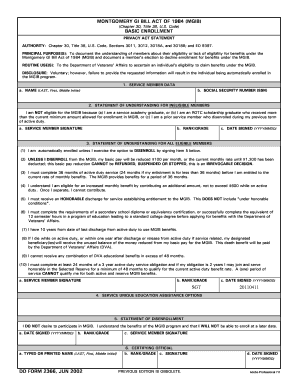
MONTGOMERY GI BILL ACT OF 1984 (MGIB) (Chapter 30, Title 38, U.S. Code) BASIC ENROLLMENT PRIVACY ACT STATEMENT AUTHORITY: Chapter 30, Title 38, U.S. Code, Sections 3011, 3012, 3018A, and 3018B; and.

How it works

  1. Open form

    Open form follow the instructions

  2. Easily sign form

    Easily sign the form with your finger

  3. Share form

    Send filled & signed form or save

How to fill out the Dd Form 2366 online

Filling out the Dd Form 2366 is a crucial step for individuals looking to enroll in the Montgomery GI Bill Act of 1984. This guide provides a detailed, step-by-step approach to completing the form online, ensuring that you can navigate through the process with ease and confidence.

Follow the steps to complete the Dd Form 2366.

  1. Use the ‘Get Form’ button to access the Dd Form 2366. This will open the form in your online editor, ready for you to fill out.
  2. In the 'Service Member Data' section, provide your name in the format of last name, first name, and middle initial. Ensure accuracy to prevent any issues with your application.
  3. For the 'Statement of Understanding for Ineligible Members,' indicate your ineligibility reason by selecting one of the provided options. This section requires your signature, rank or grade, and the date signed.
  4. Complete the necessary affirmations in this section, including confirmations regarding your basic pay reduction and requirements for eligibility. Provide your signature, rank or grade, and the date signed.
  5. Lastly, the 'Certifying Official' section must be completed, including the official's rank/grade, signature, and date signed for verification purposes.
  6. Once all sections are filled out, review the form for any errors or missing information. You can then save, download, print, or share the completed form as needed.

Complete your Dd Form 2366 online today to ensure your eligibility for the Montgomery GI Bill benefits.

Get form

Experience a faster way to fill out and sign forms on the web. Access the most extensive library of templates available.
Get form

Related content

$600 Buy-Up Program | Veterans Affairs
Apr 30, 2020 — Decide how much extra you want to contribute. · Fill out a form called...
Learn more
DD Form 2366 - 1, Montgomery G I Bill Act of 1984...
(1) I am eligible to contribute an additional amount to increase my MGIB benefits...
Learn more
Vasectomy - American Urological Association
Vasectomy is intended to be a permanent form of contraception. • Vasectomy does not...
Learn more

Related links form

Txbingo Mv215 Dmv Vision Test Form Personal Disclosure Form - Lethbridge Regional Police Service - Lethbridgepolice

Questions & Answers

Get answers to your most pressing questions about US Legal Forms API.

Contact support

The option to disenroll must occur within the first three working days of entering active duty. The member's DD Form 2366 (enrollment/disenrollment form) is initiated at the Military Entrance and Processing Station (MEPS), but it must be finalized after the MGIB briefing during the first duty station processing.

PRINCIPAL PURPOSE(S): To establish participation in the Montgomery GI Bill Increased Benefit Contribution Program. ROUTINE USE(S): To the Department of Veterans' Affairs to verify an individual's participation in the MGIB Increased Contribution Program.

You have 10 years to use your Montgomery GI Bill (MGIB) benefits after you separate from the military. If you don't use your benefits in this time frame, you may be able to get a refund of part or all of your payments into this program.

If you are wondering whether you “can” or “should” use your GI Bill benefits while on active duty service, here is our answer: Yes, you can use your GI Bill while on active duty.

THE $600 BUY-UP PROGRAM If you are currently serving, this program allows you to contribute money from your own paycheck to increase the amount of Montgomery GI Bill—Active Duty benefit payments you receive each month. With a $600 monthly contribution, you can get up to an additional $5,400 each month in benefits.

All necessary documents. The documents needed are: DD214 Certificate of Release or Discharge from Active Duty for most recent period of active duty. Any other documents you think are necessary.

Servicemembers and honorably discharged Veterans who were awarded a Purple Heart on or after September 11, 2001 will be entitled to Post-9/11 GI Bill benefits at the 100-percent benefit level for up to 36 months.

Servicemembers, Veterans, and National Guard and Reserve Members Apply online. To get your Certificate of Eligibility (COE) online, please go to the eBenefits portal. ... Apply through CalVet Home Loans. Most lenders have access to the Web LGY system. ... Apply by mail. Use VA Form 26-1880, Request for Certificate of Eligibility.

Get This Form Now!

Use professional pre-built templates to fill in and sign documents online faster. Get access to thousands of forms.
Get form
If you believe that this page should be taken down, please follow our DMCA take down processhere.
Get Dd Form 2366
Get form
  • Adoption
  • Bankruptcy
  • Contractors
  • Divorce
  • Home Sales
  • Employment
  • Identity Theft
  • Incorporation
  • Landlord Tenant
  • Living Trust
  • Name Change
  • Personal Planning
  • Small Business
  • Wills & Estates
  • Packages A-Z
  • Affidavits
  • Bankruptcy
  • Bill of Sale
  • Corporate - LLC
  • Divorce
  • Employment
  • Identity Theft
  • Internet Technology
  • Landlord Tenant
  • Living Wills
  • Name Change
  • Power of Attorney
  • Real Estate
  • Small Estates
  • Wills
  • All Forms
  • Forms A-Z
  • Other Templates
  • Legal Hub
  • About Us
  • Help Portal
  • Legal Resources
  • Blog
  • Affiliates
  • Contact Us
  • Delete My Account
  • Site Map
  • Industries
  • Forms in Spanish
  • Localized Forms
  • State-specific Forms
  • Forms Kit
  • Real Estate Handbook
  • All Guides
  • Notarize
  • Incorporation services
  • For Consumers
  • For Small Business
  • For Attorneys
  • USLegal
  • FormsPass
  • pdfFiller
  • signNow
  • altaFlow
  • DocHub
  • Instapage
Form Packages
  • Adoption
  • Bankruptcy
  • Contractors
  • Divorce
  • Home Sales
  • Employment
  • Identity Theft
  • Incorporation
  • Landlord Tenant
  • Living Trust
  • Name Change
  • Personal Planning
  • Small Business
  • Wills & Estates
  • Packages A-Z
Form Categories
  • Affidavits
  • Bankruptcy
  • Bill of Sale
  • Corporate - LLC
  • Divorce
  • Employment
  • Identity Theft
  • Internet Technology
  • Landlord Tenant
  • Living Wills
  • Name Change
  • Power of Attorney
  • Real Estate
  • Small Estates
  • Wills
  • All Forms
  • Forms A-Z
  • Other Templates
Customer Service
  • Legal Hub
  • About Us
  • Help Portal
  • Legal Resources
  • Blog
  • Affiliates
  • Contact Us
  • Delete My Account
  • Site Map
  • Industries
  • Forms in Spanish
  • Localized Forms
  • State-specific Forms
  • Forms Kit
Legal Guides
  • Real Estate Handbook
  • All Guides
Prepared for you
  • Notarize
  • Incorporation services
Our Customers
  • For Consumers
  • For Small Business
  • For Attorneys
Our Sites
  • USLegal
  • FormsPass
  • pdfFiller
  • signNow
  • altaFlow
  • DocHub
  • Instapage
Social Media
Call us now toll free:
+1 833 426 79 33
As seen in:
© Copyright 1999-2026 airSlate Legal Forms, Inc. 17 Station Street, Ste. 203, Brookline, MA 02445
  • Your Privacy Choices
  • Terms of Service
  • Privacy Notice
  • Content Takedown Policy
  • Bug Bounty Program