Loading
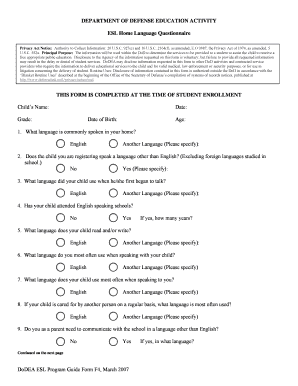
Get Dodea Esl Program Guide Form F4, March 2007 Department ...
How it works
-

Open form follow the instructions
-

Easily sign the form with your finger
-

Send filled & signed form or save
How to use or fill out the DoDEA ESL Program Guide Form F4, March 2007 DEPARTMENT ... online
Filling out the DoDEA ESL Program Guide Form F4 is an essential step in ensuring that students receive the appropriate educational services. This guide provides clear and detailed instructions on how to complete the form effectively, facilitating a smooth registration process.
Follow the steps to fill out the ESL Home Language Questionnaire accurately.
- Click the ‘Get Form’ button to obtain the form and access it in your preferred document editor.
- Start by entering the child's name at the top of the form, followed by the date, grade, date of birth, and age. Ensure all details are accurate.
- Answer the question regarding the language commonly spoken in your home by selecting either 'English' or 'Another Language' and providing the specific language if applicable.
- Indicate whether the child speaks a language other than English (excluding foreign languages studied in school) by selecting 'Yes' or 'No'. If 'Yes,' specify the language.
- Select the language your child used when they first began to talk and check either 'English' or 'Another Language' if applicable.
- State whether the child has attended English-speaking schools by selecting 'Yes' or 'No,' and if 'Yes,' specify the number of years.
- Fill in the language that your child reads and/or writes, selecting from 'English' or 'Another Language.'
- Specify the language you most often use when speaking with your child, selecting from 'English' or 'Another Language.'
- Indicate what language your child uses most often when communicating with you, choosing from 'English' or 'Another Language.'
- If another person regularly cares for your child, select the language most often used in that situation.
- Determine if you need to communicate with the school in a language other than English. Select 'Yes' or 'No,' and if 'Yes,' provide the language.
- Sign and date the permission section regarding evaluation, indicating consent for standardized testing and annual progress testing.
- Leave the section labeled 'To be completed by ESL Teacher' blank, as this will be filled out by the designated ESL Teacher.
- Once all sections are completed, review the form for accuracy, save your changes, and either download or print it for submission.
Complete the DoDEA ESL Program Guide Form F4 online to ensure your child receives the necessary educational services.