Loading
Get Participant Information Change - Retirement Services - Massmutual
How it works
-

Open form follow the instructions
-

Easily sign the form with your finger
-

Send filled & signed form or save
How to fill out the Participant Information Change - Retirement Services - MassMutual online
This guide provides step-by-step instructions on how to accurately complete the Participant Information Change form for Retirement Services at MassMutual. By following these clear instructions, you will be able to efficiently update your personal information as needed.
Follow the steps to complete your form online.
- Click ‘Get Form’ button to obtain the Participant Information Change form and open it in your editor.
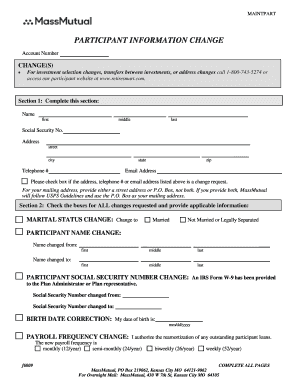
- In Section 1, fill in your name, Social Security number, address, telephone number, and email address. Ensure that you indicate if any of this information is a change request by checking the appropriate box.
- In Section 2, check the boxes corresponding to all the changes you wish to request, like marital status changes, name changes, or social security number changes. Provide the necessary information for each selected change.
- For marital status changes, specify whether you are now married or not married/legally separated. If you are changing your name, list the previous name and the new name.
- If correcting your birth date, indicate the correct date in the designated field. If there are changes to your payroll frequency, check the appropriate box and provide authorization.
- For payroll deduction changes, specify the percentage contributions you wish to make either before-tax or after-tax. You can also choose to make no contributions at this time.
- For beneficiary changes, select either a spouse or non-spouse beneficiaries and provide necessary details such as name, relationship, social security number, and percentage of the account balance.
- If applicable, include spousal consent for beneficiary designations and ensure the signatures are witnessed by either a Plan Administrator or Notary Public.
- Complete any additional sections relevant to contingent beneficiaries if you want to designate individuals who will receive your account balance after the primary beneficiaries.
- Finally, review all entries for accuracy, provide your signature and the date, and ensure that the Plan Administrator signs where required. Save your changes, and download or print the completed form for your records.
Complete your Participant Information Change form online today to ensure your records are up-to-date.
Once you are enrolled in a plan with your new employer, it's simple to rollover your old 401(k). ... However, you must deposit the funds into your new 401(k) within 60 days to avoid paying income tax on the entire balance.
Industry-leading security and compliance
US Legal Forms protects your data by complying with industry-specific security standards.
-
In businnes since 199725+ years providing professional legal documents.
-
Accredited businessGuarantees that a business meets BBB accreditation standards in the US and Canada.
-
Secured by BraintreeValidated Level 1 PCI DSS compliant payment gateway that accepts most major credit and debit card brands from across the globe.