Loading
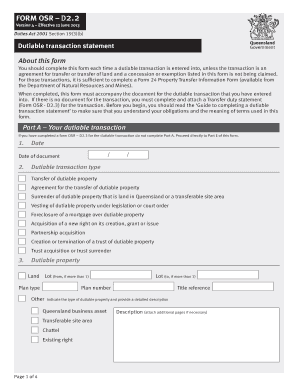
Get Form D2 2
How it works
-

Open form follow the instructions
-

Easily sign the form with your finger
-

Send filled & signed form or save
How to fill out the Form D2 2 online
This guide provides step-by-step instructions on how to accurately complete the Form D2 2 for dutiable transactions online. Whether you are familiar with legal forms or just starting, this comprehensive guide will assist you in fulfilling your obligations effectively.
Follow the steps to successfully complete the Form D2 2 online
- Click the 'Get Form' button to obtain the form and open it in the editor.
- In Part A, enter the date of the dutiable transaction. Then, choose the type of dutiable transaction from the provided options, such as transfer or surrender of property.
- Next, identify the dutiable property type. Specify the detailed description of the property, including its title reference and any relevant plan numbers.
- Proceed to Part B to fill in the transferor details. Provide the required information for all transferors, including names, addresses, and ABNs if applicable.
- In Part C, detail the transferee information. Input all necessary details for each transferee, such as their name, date of birth, and share of interest in the acquired property.
- For Part D, answer questions regarding any related parties and the dutiable value of the transaction. Ensure you accurately describe any arrangements related to the transaction.
- If claiming any concessions or exemptions, complete Part E by inserting the corresponding numbers from the guide, ensuring you provide the necessary evidence.
- Finally, complete Part F by verifying the information provided. Sign and date the form to confirm its accuracy.
- After completing the form, save your changes. You can then download, print, or share the form as needed.
Complete your forms online to ensure compliance and streamline your transactions.
Transcripts are requested online through the MyNAIT portal (Open Self Service > Academic Records > Grades, Transcripts & Assessments > Request Official Transcript). When your transcript is ready in 1-2 business days, you will receive an email confirmation from MyCreds™ to access your document.