Loading
Get 350 58
How it works
-

Open form follow the instructions
-

Easily sign the form with your finger
-

Send filled & signed form or save
How to fill out the 350 58 online
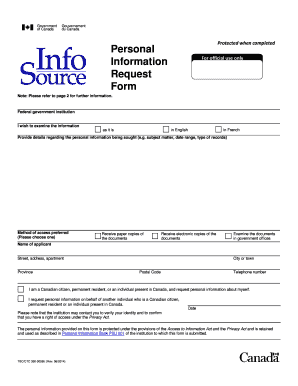
This guide provides comprehensive instructions on completing the 350 58 form online. By following the steps outlined below, you will be able to efficiently submit your personal information request under the Privacy Act.
Follow the steps to fill out the form successfully.
- Click the ‘Get Form’ button to access the form and open it for completion.
- Begin by selecting the federal government institution that is likely to hold your personal information. This information can be found using the publication Info Source.
- Indicate your preference for accessing the information. You may choose to receive paper copies, electronic copies, or examine the documents in government offices.
- Fill in your personal details, including your name, address, city, province, postal code, and telephone number. Make sure all information is accurate to avoid delays.
- State your eligibility by checking the appropriate box indicating your status as a Canadian citizen, permanent resident, or individual present in Canada. If you are requesting on behalf of someone else, select the other option.
- In the section provided, describe the personal information you wish to access, including the subject matter, date range, and type of records you are interested in.
- Review all entries on the form to ensure accuracy and completeness before submitting.
- Submit the completed form to the Access to Information and Privacy Coordinator of the relevant government institution. Follow any additional instructions provided by the institution.
- Upon submission, keep a copy of the form for your records. If you have any questions regarding your request, reach out to the institution's Access to Information and Privacy Office.
- Finally, you may save changes to the form online, download it, print a hard copy, or share it as needed.
Start filling out your request form online today to access your personal information effortlessly.
Get form
Experience a faster way to fill out and sign forms on the web. Access the most extensive library of templates available.
Marine Corps Reference Publication (MCRP) 3-0A, Unit Training Management Guide, assists unit commanders and their staffs in the preparation of unit training programs. It provides a background on the philosophy, principles, and policies of the Marine Corps training manage- ment system.
Get This Form Now!
Use professional pre-built templates to fill in and sign documents online faster. Get access to thousands of forms.