Loading
Get Rab Repair Service
How it works
-

Open form follow the instructions
-

Easily sign the form with your finger
-

Send filled & signed form or save
How to fill out the Rab Repair Service online
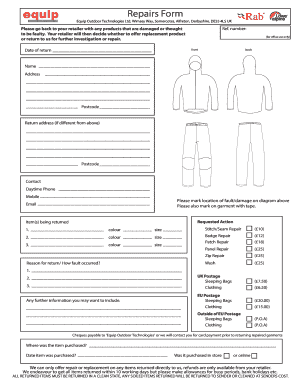
Completing the Rab Repair Service form online can facilitate the process of returning damaged items for repair. This guide provides clear instructions to help you successfully fill out the necessary information.
Follow the steps to effectively complete the Rab Repair Service form.
- Click ‘Get Form’ button to access the Rab Repair Service form and open it in your preferred editor.
- Fill in your personal information. Provide your full name, address, and postcode in the designated fields.
- Enter your contact details. Include your daytime phone number, mobile number, and email address to ensure easy communication regarding your repair.
- Indicate the date of return to document when you are sending the item back.
- Identify the item(s) you are returning. List each item along with its color and size in the provided fields.
- Select the type of repairs needed for each item. You can choose from options like stitch/seam repair, badge repair, patch repair, panel repair, and zip repair; each with the corresponding fees.
- Mark the location of any faults or damage on the diagram included in the form and additionally mark the garment with tape.
- Specify the reason for the return and detail how the fault occurred in the text area provided.
- Complete the payment section by indicating the postage cost and selecting your preferred payment method. Note that checks should be made payable to 'Equip Outdoor Technologies'.
- Finally, review all the information entered in the form for accuracy before you save, download, print, or share the completed form for processing.
Start completing your Rab Repair Service form online to ensure a smooth and efficient process.
0:13 2:49 Suggested clip How do you fix a hole in a down jacket? - YouTubeYouTubeStart of suggested clipEnd of suggested clip How do you fix a hole in a down jacket? - YouTube