Loading
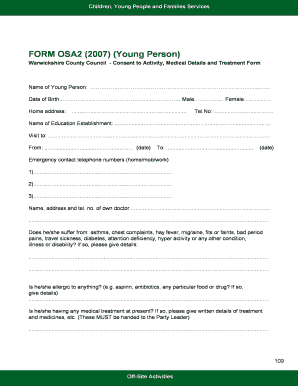
Get Form Osa2 (2007) (young Person) - Rezilient - Rezilient Org
How it works
-

Open form follow the instructions
-

Easily sign the form with your finger
-

Send filled & signed form or save
How to fill out the FORM OSA2 (2007) (Young Person) - Rezilient - Rezilient Org online
Filling out the FORM OSA2 (2007) is an important step in ensuring the safety and well-being of young individuals participating in activities or trips. This guide provides clear instructions to help users navigate each section of the form confidently.
Follow the steps to complete the form accurately.
- Press the ‘Get Form’ button to access the form and open it in the editor.
- Enter the name of the young person in the designated field. Ensure the spelling is correct and matches official documents.
- Fill in the date of birth by selecting or typing the appropriate date in the specified format.
- Indicate the gender of the young person by selecting either 'Male' or 'Female.'
- Provide the home address of the young person in the relevant section, ensuring accuracy in details.
- Include a contact telephone number in the designated field.
- State the name of the educational establishment the young person attends.
- Specify the location of the visit and fill in the dates for the trip, including start and end dates.
- List emergency contact telephone numbers, ensuring that at least three different numbers are provided.
- Fill in the name, address, and contact number of the young person's doctor for medical references.
- Answer health-related questions by indicating if the young person suffers from any medical conditions, allergies, or is on current medication, providing detailed explanations as necessary.
- Mention any known conditions that may prevent full participation in activities and specify if there are activities the young person should avoid.
- If known, provide the date of the last anti-tetanus injection.
- Add any additional information relevant to the party leader regarding the young person.
- Indicate any dietary requirements that the young person may have.
- Sign the consent section, providing a printed name, signature, and the date to indicate agreement for the young person’s participation in activities.
- Review the entire form for accuracy, then save changes, download, print, or share the completed form as needed.
Complete the FORM OSA2 (2007) online to ensure your young person's safe participation in activities.
Industry-leading security and compliance
US Legal Forms protects your data by complying with industry-specific security standards.
-
In businnes since 199725+ years providing professional legal documents.
-
Accredited businessGuarantees that a business meets BBB accreditation standards in the US and Canada.
-
Secured by BraintreeValidated Level 1 PCI DSS compliant payment gateway that accepts most major credit and debit card brands from across the globe.