Loading
Get Application And Registration To Become A Volunteer - Barnet And ... - Bcf Nhs
How it works
-

Open form follow the instructions
-

Easily sign the form with your finger
-

Send filled & signed form or save
How to fill out the Application And Registration To Become A Volunteer - Barnet And ... - Bcf Nhs online
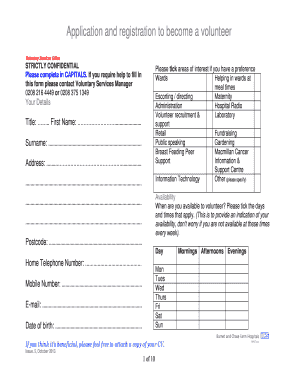
This guide provides step-by-step instructions for completing the Application And Registration To Become A Volunteer form for Barnet and Chase Farm Hospitals NHS Trust. Whether you are new to volunteering or have experience, this comprehensive guide will help you navigate the application process with ease.
Follow the steps to complete your application form successfully.
- Press the ‘Get Form’ button to access and open the Application And Registration To Become A Volunteer form.
- Fill in your personal details. Start with your title, first name, and surname. Then, provide your address and postcode. Ensure to capitalize all entries.
- Indicate your availability by ticking the days and times you are available to volunteer. This section helps the organization understand your commitment, so be honest.
- In the section titled 'Your interest in volunteering', choose your preferred location and specify your reasons for applying by ticking the relevant boxes. Provide additional details if necessary.
- Complete the 'Previous Work Experience or Employment' section by detailing any relevant voluntary or paid work history, including employer's contact information, dates, and responsibilities.
- Answer the nationality and immigration status questions accurately. If you are a non-EU national, provide the required visa details.
- Enter your emergency contact information. This includes the name, relationship to you, address, and phone numbers of your emergency contact person.
- List two referees, excluding family members, by providing their names, addresses, phone numbers, email addresses, and how long you have known them.
- Read through the important information section, including your agreement to the requirements of the Trust and signing it to confirm your understanding and truthfulness of the information provided.
- Fill out the monitoring information section for demographic purposes. Be assured that this is anonymous and aids in promoting equality within the organization.
- Before submitting, review your entire application for accuracy. You can then save changes, download a copy, print the form, or share it as required.
Start your journey as a volunteer by completing the application form online today!
Industry-leading security and compliance
US Legal Forms protects your data by complying with industry-specific security standards.
-
In businnes since 199725+ years providing professional legal documents.
-
Accredited businessGuarantees that a business meets BBB accreditation standards in the US and Canada.
-
Secured by BraintreeValidated Level 1 PCI DSS compliant payment gateway that accepts most major credit and debit card brands from across the globe.