Loading
Form preview
  • US Legal Forms
  • Other Templates
  • More Forms
  • More Uncategorized Forms
  • Midamerica Biz

Get Midamerica Biz

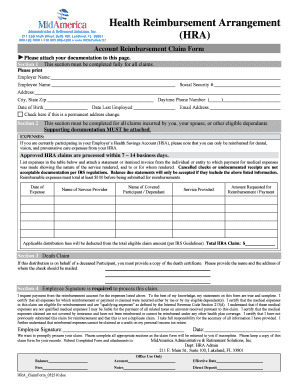
Take full responsibility for the accuracy of all information I have provided. I further understand that reimbursed expenses cannot be claimed as a credit on my personal income tax return. Employee Signature: Date: We want to promptly process your claim. Please complete all appropriate sections as the claim form will be returned to you if incomplete. Please keep a copy of this claim form for your records. Submit Completed Form and attachments to: MidAmerica Administrative & Retirement Solution.

How it works

  1. Open form

    Open form follow the instructions

  2. Easily sign form

    Easily sign the form with your finger

  3. Share form

    Send filled & signed form or save

How to fill out the Midamerica Biz online

Filling out the Midamerica Biz form is essential for submitting health reimbursement claims accurately. This guide will provide you with a step-by-step approach, ensuring you complete each section with confidence and clarity.

Follow the steps to fill out the Midamerica Biz form effectively.

  1. Press the ‘Get Form’ button to access the form and open it in your preferred editor.
  2. Begin by completing Section 1. Fill in all required personal information, including your employer's name, social security number, your name and address, daytime phone number, email address, city, state, zip code, date last employed, and date of birth. If this is a permanent address change, check the appropriate box.
  3. Proceed to Section 2, where you'll list all expenses related to healthcare incurred by you, your spouse, or eligible dependents. Attach necessary supporting documentation, ensuring it meets IRS standards. Indicate each expense item in the provided table, detailing the date of the expense, the service provider's name, the covered participant's name, the service rendered, and the amount requested for reimbursement.
  4. If you are submitting a claim on behalf of a deceased participant, complete Section 3 by providing the name and address where the check should be mailed, along with a copy of the death certificate.
  5. In Section 4, ensure that you sign and date the form to authorize processing. This signature is mandatory for the claim to be considered.
  6. Before submitting, review the entire form for completeness. Incomplete submissions will be returned. Save a copy of the completed claim form for your records.
  7. Finally, submit the completed form along with all attachments to MidAmerica Administrative & Retirement Solutions, Inc. Make sure to follow the submission address provided at the bottom of the form.

Take action now and complete your Midamerica Biz form online for a streamlined claims process.

Get form

Experience a faster way to fill out and sign forms on the web. Access the most extensive library of templates available.
Get form

Related content

Form for Direct Deposit of Leave Pay from City of...
I authorize MidAmerica Administrative & Retirement Solutions, Inc. to deposit my Special...
Learn more
Sample Employer Resolution for the - MidAmerica
800.430.7999 ♢ Fax 863.688.4200 ♢ www.midamerica.biz ... Simply complete and submit to...
Learn more
June, 1968 - UserManual.wiki
MID-AMERICA COMPUTER & DATA PROCESSING. CENTER, 306 W.O.W. Bldg., 14th ... Automated...
Learn more

Related links form

Percy Walker Pool Release Form - Town Of Duxbury Substandard Structures-Forms - Texas Municipal League - Tml Building Industry And Land Development Association Of The Landlord Notice To Quit Nova Scotia

Questions & Answers

Get answers to your most pressing questions about US Legal Forms API.

Contact support

Call "radio check" three times, followed by your boat name and location. Wait for a reply confirming someone has heard your transmission. For general communications, always use channel 16.

Out – All conversation is finished, and the channel is clear for others to use. Break, Break, Break – You are interrupting in the middle of communication because you have an emergency. Read You Loud & Clear – Response to “Radio Check”. This means your transmission signal is good. ″.

“Over”, used at the end of a transmission, tells the receiver that the transmitter has finished that section of their broadcast and is expecting and will await a response. “Out” means that the transmitter has finished speaking and is not expecting to hear any more from the receiver.

“Out” is used to signal the end of the conversation between users. So when responding to a request for information or compliance, a user would say “Over” at the end of their transmissions.

Radio Check – What is my signal strength? Can you hear me? Go Ahead – You are ready to receive transmission. Stand-by – You acknowledge the other party, but I am unable to respond immediately.

4 Golden Rules fo Radio Communication Clarity. Your voice should be clear. ... Simplicity. Keep your message simple enough for intended listeners to understand. Brevity. Be precise and to the point. Security. Do not transmit confidential information on a radio unless you know the proper security technology is in place.

In the fire service, we've all heard of the five C's of radio communication: conciseness, clarity, confidence, control and capability. Mastering these five C's brings an ideal atmosphere for effectively talking on the fireground.

Alfa, Bravo, Charlie, Delta, Echo, Foxtrot, Golf, Hotel, India, Juliett, Kilo, Lima, Mike, November, Oscar, Papa, Quebec, Romeo, Sierra, Tango, Uniform, Victor, Whiskey, X-ray, Yankee, Zulu.

Get This Form Now!

Use professional pre-built templates to fill in and sign documents online faster. Get access to thousands of forms.
Get form
If you believe that this page should be taken down, please follow our DMCA take down processhere.
Get Midamerica Biz
Get form
  • Adoption
  • Bankruptcy
  • Contractors
  • Divorce
  • Home Sales
  • Employment
  • Identity Theft
  • Incorporation
  • Landlord Tenant
  • Living Trust
  • Name Change
  • Personal Planning
  • Small Business
  • Wills & Estates
  • Packages A-Z
  • Affidavits
  • Bankruptcy
  • Bill of Sale
  • Corporate - LLC
  • Divorce
  • Employment
  • Identity Theft
  • Internet Technology
  • Landlord Tenant
  • Living Wills
  • Name Change
  • Power of Attorney
  • Real Estate
  • Small Estates
  • Wills
  • All Forms
  • Forms A-Z
  • Other Templates
  • Legal Hub
  • About Us
  • Help Portal
  • Legal Resources
  • Blog
  • Affiliates
  • Contact Us
  • Delete My Account
  • Site Map
  • Industries
  • Forms in Spanish
  • Localized Forms
  • State-specific Forms
  • Forms Kit
  • Real Estate Handbook
  • All Guides
  • Notarize
  • Incorporation services
  • For Consumers
  • For Small Business
  • For Attorneys
  • USLegal
  • FormsPass
  • pdfFiller
  • signNow
  • altaFlow
  • DocHub
  • Instapage
Form Packages
  • Adoption
  • Bankruptcy
  • Contractors
  • Divorce
  • Home Sales
  • Employment
  • Identity Theft
  • Incorporation
  • Landlord Tenant
  • Living Trust
  • Name Change
  • Personal Planning
  • Small Business
  • Wills & Estates
  • Packages A-Z
Form Categories
  • Affidavits
  • Bankruptcy
  • Bill of Sale
  • Corporate - LLC
  • Divorce
  • Employment
  • Identity Theft
  • Internet Technology
  • Landlord Tenant
  • Living Wills
  • Name Change
  • Power of Attorney
  • Real Estate
  • Small Estates
  • Wills
  • All Forms
  • Forms A-Z
  • Other Templates
Customer Service
  • Legal Hub
  • About Us
  • Help Portal
  • Legal Resources
  • Blog
  • Affiliates
  • Contact Us
  • Delete My Account
  • Site Map
  • Industries
  • Forms in Spanish
  • Localized Forms
  • State-specific Forms
  • Forms Kit
Legal Guides
  • Real Estate Handbook
  • All Guides
Prepared for you
  • Notarize
  • Incorporation services
Our Customers
  • For Consumers
  • For Small Business
  • For Attorneys
Our Sites
  • USLegal
  • FormsPass
  • pdfFiller
  • signNow
  • altaFlow
  • DocHub
  • Instapage
Social Media
Call us now toll free:
+1 833 426 79 33
As seen in:
© Copyright 1999-2026 airSlate Legal Forms, Inc. 17 Station Street, Ste. 203, Brookline, MA 02445
  • Your Privacy Choices
  • Terms of Service
  • Privacy Notice
  • Content Takedown Policy
  • Bug Bounty Program