Loading
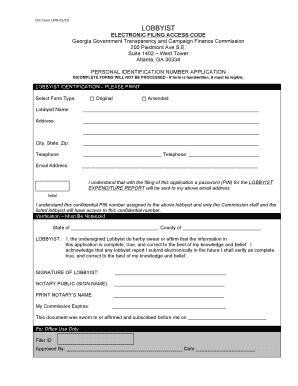
Get Lobbyist Pin Application Form - State Ethics Commission - Ethics Ga
How it works
-

Open form follow the instructions
-

Easily sign the form with your finger
-

Send filled & signed form or save
How to fill out the Lobbyist PIN Application Form - State Ethics Commission - Ethics Ga online
Filling out the Lobbyist PIN Application Form can be a straightforward process if approached step by step. This guide provides clear instructions tailored for users of all experience levels to ensure successful completion of the online application.
Follow the steps to complete your application efficiently.
- Press the ‘Get Form’ button to access the Lobbyist PIN Application Form and open it in an editable format.
- Begin the form by selecting the appropriate form type: Original or Amended. Clearly indicate your choice to avoid processing delays.
- Enter the lobbyist's full name in the designated field. Ensure that your name is spelled correctly and formatted properly.
- Provide the complete address of the lobbyist, which should include street address, city, state, and zip code. This information must be accurate for effective communication.
- Fill in the telephone number (including area code) in the corresponding field, ensuring it is correct as this may be used for future correspondence.
- Input a valid email address. It is essential because a password (PIN) for the Lobbyist Expenditure Report will be sent to this email.
- Acknowledge your understanding regarding the confidentiality of the PIN number by signing the initial field provided.
- Proceed to the verification section, which must be notarized. Fill in the state and county information, and complete the statement confirming the accuracy of the information provided.
- As the lobbyist, provide your signature in the designated space to validate the information presented on the form.
- Have the notary public sign in the specified area, and ensure they print their name and state the expiration date of their commission.
- Finally, save your changes. You may then download, print, or share the completed form as needed.
Complete your Lobbyist PIN Application Form online today to ensure your compliance with state regulations.
Georgia Ethics Helpline 404-527-8720 or 800-334-6865 The Office of the General Counsel operates a Lawyer Helpline for members of the State Bar of Georgia who are faced with ethical dilemmas.
Industry-leading security and compliance
US Legal Forms protects your data by complying with industry-specific security standards.
-
In businnes since 199725+ years providing professional legal documents.
-
Accredited businessGuarantees that a business meets BBB accreditation standards in the US and Canada.
-
Secured by BraintreeValidated Level 1 PCI DSS compliant payment gateway that accepts most major credit and debit card brands from across the globe.