Loading
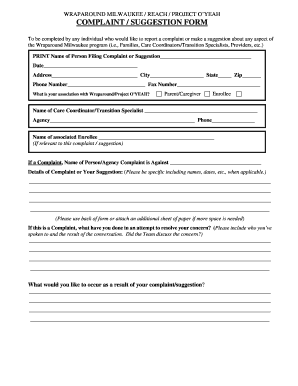
Get Complaint/suggestion Form - Milwaukee County - County Milwaukee
How it works
-

Open form follow the instructions
-

Easily sign the form with your finger
-

Send filled & signed form or save
How to fill out the Complaint/Suggestion Form - Milwaukee County online
This guide provides a clear and supportive overview of how to complete the Complaint/Suggestion Form for the Wraparound Milwaukee program. Whether you have a complaint or a suggestion, this step-by-step guide is designed to assist you in effectively conveying your message.
Follow the steps to fill out the form online effectively.
- Click ‘Get Form’ button to obtain the form and open it in the preferred document editor.
- Begin by entering the name of the person filing the complaint or suggestion in the designated field. This information is essential for identification purposes.
- Next, fill in the date when you are submitting the form. This ensures that your complaint or suggestion is recorded accurately in time.
- Provide your complete address, including city, state, and zip code. This information helps in contacting you if further details are required.
- Enter your phone number for any follow-up actions regarding your submission. If available, include a fax number.
- Indicate your association with the Wraparound/Project O’YEAH by selecting the appropriate option such as parent, caregiver, or enrollee.
- If applicable, write the name of the care coordinator or transition specialist you are working with, along with their agency and phone number.
- If your complaint or suggestion is related to a specific enrollee, please provide their name in the relevant field.
- If you are filing a complaint, specify the name of the person or agency the complaint is against. This helps direct your concern to the appropriate party.
- In the details section, clearly outline the nature of your complaint or suggestion. Be as specific as possible by including relevant names, dates, and events.
- If your complaint requires more space for details, use the back of the form or attach additional sheets of paper as needed.
- If this is a complaint, describe any previous actions you have taken to address the concern and the outcomes of those conversations.
- State what you would like to occur as a result of your complaint or suggestion. Clearly express your desired outcome.
- Finally, sign the form to validate your submission. If a care coordinator or transition specialist completes the form on your behalf, their supervisor should also sign.
- Once completed, you can save changes, download, print, or share the form as needed.
Take action today by completing the Complaint/Suggestion Form online and having your voice heard.
Add page numbers to a header or footer in Word Click or tap in the header or footer where you want the page numbers to go. Go to Insert > Page Numbering. Select Current Position. Choose a style.