Loading
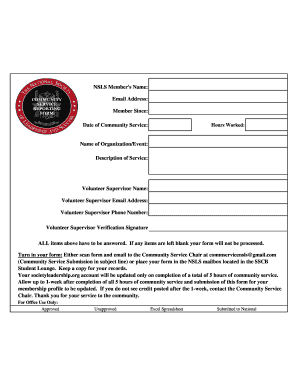
Get Nsls Member's Name: Email Address: Member Since: Date Of Community Service: Hours Worked: Name Of
How it works
-

Open form follow the instructions
-

Easily sign the form with your finger
-

Send filled & signed form or save
How to fill out the NSLS Member's name, email address, member since, date of community service, hours worked, and name of organization/event online
Filling out the NSLS membership community service form accurately is essential for processing your service hours. This guide will walk you through each section of the form to ensure that all required information is provided correctly.
Follow the steps to complete your form without hassle.
- Click the ‘Get Form’ button to download the form and open it in your preferred document editor.
- Fill in the NSLS Member's name with your full name as it appears on your membership account. Ensure the spelling is correct to avoid any processing delays.
- Enter your email address, which should match the one linked to your NSLS membership. This will ensure that you receive all relevant communications regarding your community service hours.
- Indicate the date you became a member by entering the month, day, and year in the 'Member Since' field. This information is important for your membership profile.
- Provide the date of community service completed. Make sure this date reflects the actual day you performed the volunteer work.
- Record the total hours worked during community service in the 'Hours Worked' section. Only submit counts of hours that contribute to the five-hour minimum requirement for NSLS updates.
- In the 'Name of Organization/Event' field, write the name of the organization or event where you served. This helps in verifying your service.
- Next, describe the nature of the service performed in the 'Description of Service' field. Be concise but detailed enough to explain your contributions.
- Provide the volunteer supervisor's name, email address, and phone number. This person will verify your hours and the service you performed.
- The volunteer supervisor must sign the 'Volunteer Supervisor Verification Signature' field to confirm the accuracy of the submitted information.
- Review your completed form to ensure no fields are left blank, as incomplete forms will not be processed.
- Choose how to submit your form. You can either scan the completed form and email it to the Community Service Chair at commservicensls@gmail.com with 'Community Service Submission' in the subject line, or submit it in-person at the NSLS mailbox located in the SSCB Student Lounge.
- After submission, keep a copy of the form for your records.
- Allow up to one week after submission for your NSLS membership profile to be updated once you have completed five hours of community service.
Start completing your NSLS community service document online today for timely processing.
For inquires, please email help@nsls.org.
Industry-leading security and compliance
US Legal Forms protects your data by complying with industry-specific security standards.
-
In businnes since 199725+ years providing professional legal documents.
-
Accredited businessGuarantees that a business meets BBB accreditation standards in the US and Canada.
-
Secured by BraintreeValidated Level 1 PCI DSS compliant payment gateway that accepts most major credit and debit card brands from across the globe.